I remember the first time I started coding in Java when I was around 12 or 13. Writing loops to create asterisk patterns felt so meaningful and beautiful. But, since last year when I tried to build my own product, creating software across 4 different languages seemed somewhat abstract and unrewarding because Claude always seemed to have a better solution. Because of this product, I had to learn about inference systems and hence, CUDA. I am glad that I did. CUDA feels writing those loops to draw patterns once again. It was a long confusing journey to learn what I know and I want it to be more straightforward for you.
The approach
The best way to understand and go about writing CUDA kernels would be to understand the hardware, look at how the compiler instructions work and connect them both. Programming model comes easy after that.
The table of discussion would be as follows:
- Hardware, memory and compiler — we shall understand how the hardware functions, how memory is transferred and how compiler comes into picture in all of this
- Writing kernels — now that we understand how memory moves around, how do we actually compute them
Covered in future blog :
- CUTLASS — a more abstracted programming model
- Inference Engine and optimizations — what other problems does a kernel implementation face when hosted in GPUs that get real-time requests
- Writing an end-to-end inference engine — we shall have a go at writing a small LLM
- Open source contribution worklog — I would share my endeavors in the open source community
I have tried reading tons of blogs, articles, documentations, in a order that didn’t make sense to me at first. If I were to start out again, I would choose to learn the topics in this way. Hold onto your seats, because we are going to make the GPUs go brrrr.
The hardware
You pay big bucks to a GPU manufacturer to perform extremely fast and parallel computations on a GPU. Imagine going to a water park without a map and getting stuck on a single ride. You think you had enough fun but you could have had way more. Similarly, knowing the hardware lets you extract so much more out of the performance. More importantly, understanding hardware works makes the various abstract rules you follow while writing kernels seem much more natural.
Now, what GPU vendor do you choose? What programming model do you begin with? Both the choice are very important because you are going to spend significant time understanding the hardware and always thinking about how this programming model maps to the hardware. There are tons of hardware out there — AMD, Intel, NVIDIA, Apple, each with their hardware, compiler, programming models. There are some programming models like OpenCL that support multiple vendors in theory, but practically they just lack severely in performance. As Aleksa Gordic said, making the kernel 1% faster is equivalent to saving one nuclear reactor. So, we shall optimize the heck out of everything.
For our case, I will be covering H100 GPU by NVIDIA. We will try to understand hows, whats and whys of each components. Also, we will look into how these affect various compiler instructions and rules around memory transfer.
PTX & SASS
Whenever we write a CUDA kernel (not that we know how to yet), it ultimately gets morphed into these weird looking code that the GPU understands. Any code you write is basically a combination of very low-level instructions (or Instruction Set Architecture). The programming model you write in is designed to behave in a certain way keeping in mind how these low-level instructions work. If you have come from CPP, Rust or JS (lol) background, you seldom look at any such machine codes. But, we need to do so here in order to extract even the tinniest bit of performance that is left, which is equivalent to saving thousands of dollars when you are computing in scale.
Your CPP CUDA code is compiled to PTX. PTX is a virtual ISA (Instruction Set Architecture). This is called virtual because PTX code has yet to incorporate any limits of register, isn’t mapped 1:1 and some other abstracts. NVIDIA has chosen to have a virtual ISA because every generation of GPU has different architecture and also modified ISA. In the absence of a virtual ISA, any previously written code had to be re-written for newer hardware. Depending on your hardware, the compiled PTX is assembled to different SASS (the real machine code).
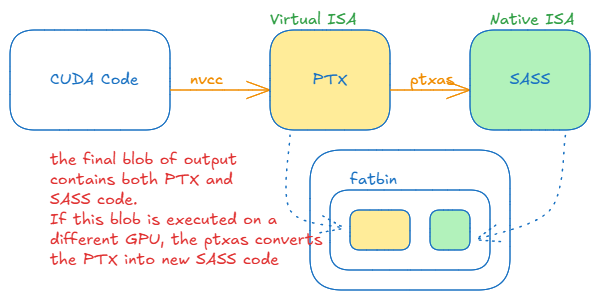
Luckily for us, this doesn’t mean we have to start writing our code in PTX or SASS. Neither do we need to understand every instruction there is. We will keep looking at certain optimized instructions and improve on our pattern recognition skill.
Overview of GPU Architecture
We will open up a GPU and look what’s inside. Our goal here is to understand the whole lot of the components.
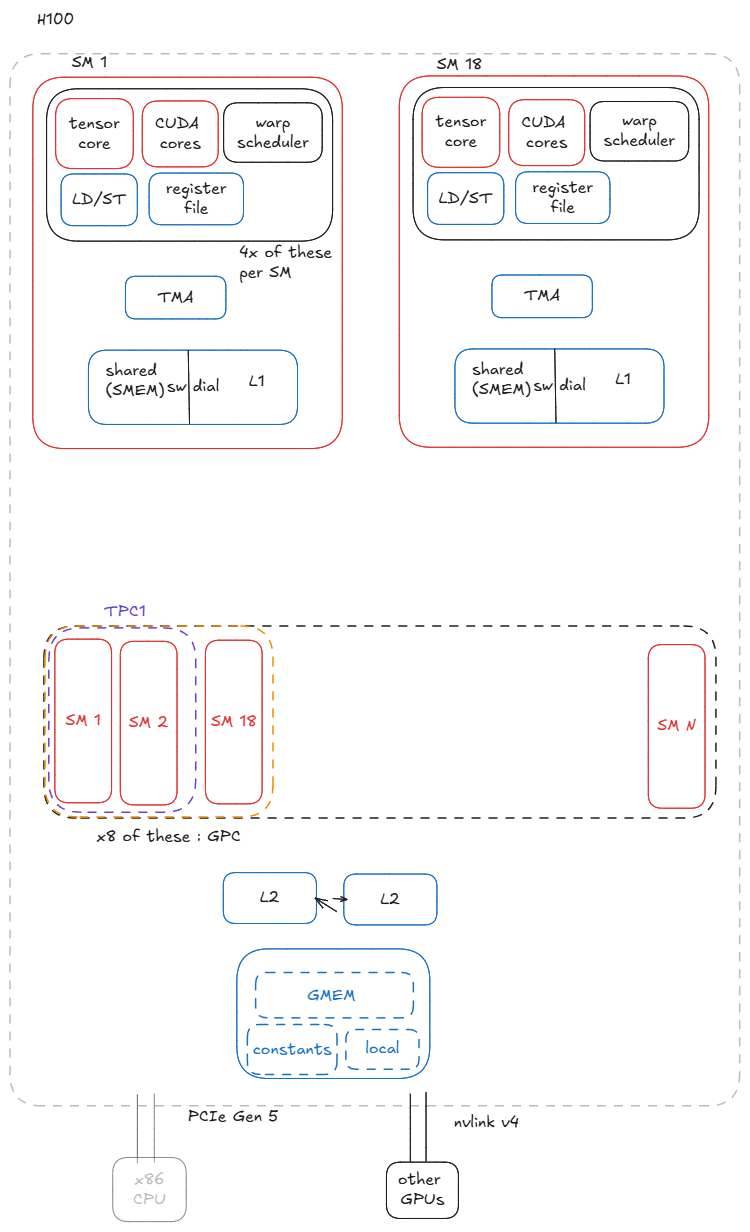
H100 architecture. This is a simplified version of Aleksa’s depiction.
Seems daunting enough (if not, look at Aleksa’s diagram). We shall put together how all these components work and coordinate.
If we look into how the GPU is structured, we would find it has 8 GPCs (Graphics Processing Cluster) — the structure with the orange dotted line, each GPC can have 9 TPCs (Texture Processing Cluster) — purple dotted line, and each TPC have 2 SMs (Streaming Multiprocessors). The H100 GPU above has 2 variants — SXM and PCIe[1]. Now, looking into what a SM holds, we see it has 4 blocks of — a tensor core, CUDA cores, LD/ST block, warp scheduler and register file. Sadly, in order to understand the role tensor core and warp scheduler, we have to understand the programming model.
Programming Model Hierarchy, Warps, Tensor & CUDA cores
Let’s take a step back and understand why GPUs are more suited to matrix multiplication than CPU. A CPU is made to execute a very branchy and complex program as quick as possible. The die space on CPU goes to efficiently predict these branches. Whereas, GPU just has much more arithmetic units instead of these branch predictor logic chips. This makes a thread[2] in GPU much more weaker and slower than CPU. But, matrix multiplication and addition operations usually don’t have any branchy code and the operations are identical throughout. Perfect for our GPU.
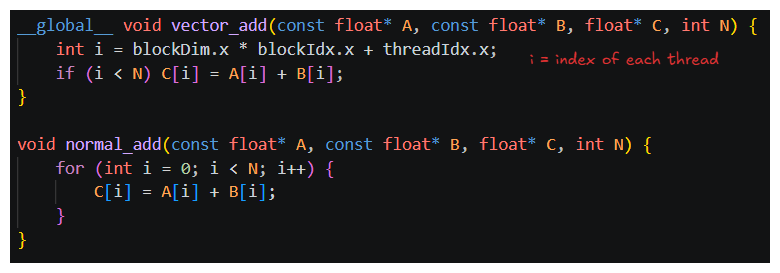
Let’s make use of the fact that matrix addition operation is identical across all elements. Instead of creating a normal loop to add all the elements (as we see in normal_add), we write a kernel (code that every thread executes) that just does one addition per thread. So, the total number of threads we need to launch in our GPU should be equal to N. To launch this kernel we write —
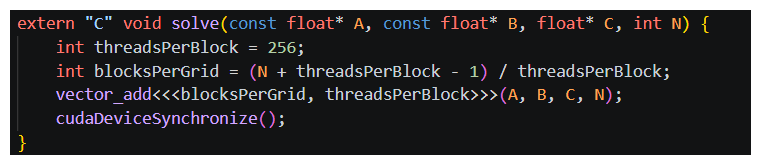
We launch the kernel with blocksPerGrid and each block having 256 threads. That seems weird! Why create these blocksPerGrid and threadsPerBlock instead of just launching the kernel with N threads directly? This design decision is inherited from the hardware. As we have seen we are grouping a bunch of similar components into another (SM→ TPC, TPC→GPC), we do the same in our programming model as well. Hence, a grid contains blocks and each block contains thread. (The grid or block can be 2 or 3-dimensional. It doesn’t provide any special performance boost. This is just cosmetics for the programmer to have a better mental model.)
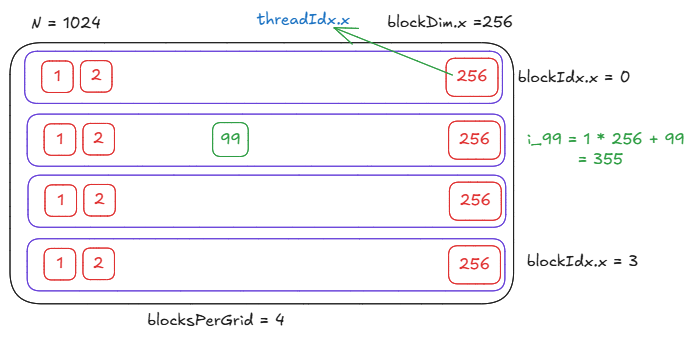
There is also a special group of threads called warp — a group of 32 threads. Note that we had seen a warp scheduler in our SM diagram. You might think all the threads of the GPU run at once. In reality there is significant delay or stall (loading or storing values can cause this) between these threads. So, threads across various warps go about following different instruction, but, threads in a warp are given (almost[3] same instructions. These instructions are provided by a warp scheduler. A SM has 4 warp schedulers, meaning a SM can give instructions to 4 warps at one time. Whenever a warp is stalled, a new warp is given instruction. This instruction switching between warps is free of cost and keeps the GPU busy. Let’s look into the PTX of the above to understand these stalls better.
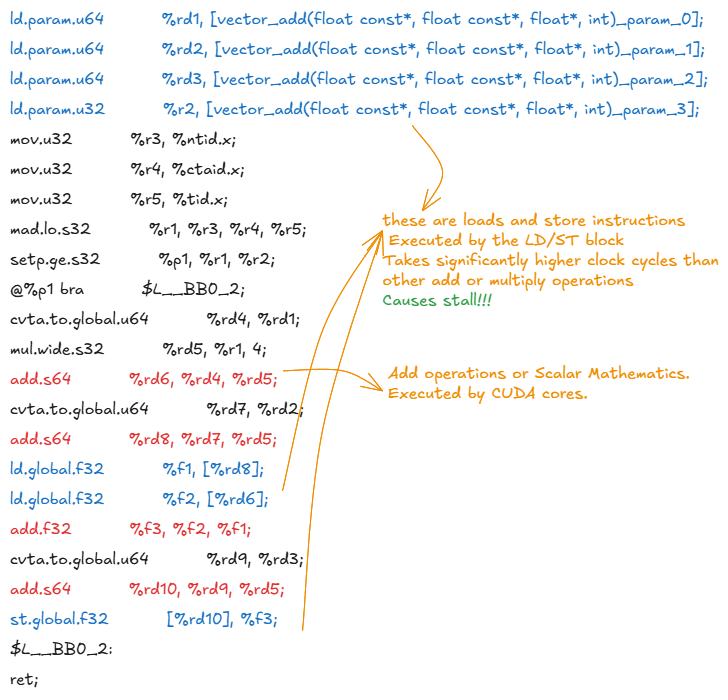
When the LD/ST block execute instructions, we need to wait for a longer period before we can jump to the next instruction. This waiting time spent without compute is just wasted time. This is where the instruction switching between warps come in. We just switch to another warp that is not stalled and execute other operations.
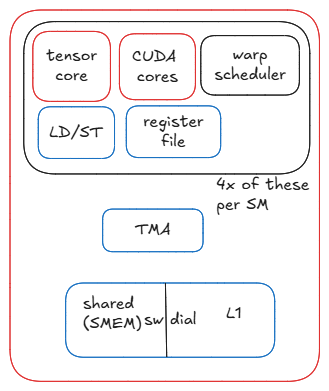
Each quadrant of the SM has 256 CUDA cores but just a single tensor core. Tensor core are highly powerful units that perform approximately 16x floating point operations (FLOPs) per clock cycle that of CUDA cores but they require 4 warps coordinating for them to work[5]. Why not just replace CUDA cores with Tensor cores then? That’s a good argument but tensor core produce this 16x FLOPs by having larger physical size and consuming more power. Also, they just perform multiply-add operations. This certainly seems like CPU vs GPU argument. The specialized one although powerful, has tradeoffs. In this case, CUDA cores help us perform scalar multiplication, division, and trigonometric calculations.
Occupancy and thread limits
For now, the only performance metric we need to concern ourselves is — keep the GPU busy always. This is obviously reinforced by the warp scheduler. What happens when our SM doesn’t have enough warps? What is the maximum warps or block size we can declare for a SM?
We never explicitly declare the number of blocks to be run concurrently in a SM. The GPU also follow the same metric as us — “keep the GPU busy”. So, it runs the maximum number of blocks it can concurrently. Sadly, we have some constraints to follow by our overlords at NVIDIA. The maximum number of threads we can assign to a block is 1024. And, the maximum threads a SM can run is 2048. In a 1024-block case, there will be 2 blocks running concurrently. 2048 threads = 64 warps. Enough warps for our 4 warp scheduler to stay busy. Now, our “keep the GPU busy” has a measurable metric — occupancy. The ratio of active warps to maximum warps.
Ins and outs of Memory
We have covered various part of SM till now in the GPU architecture. We have intentionally left out the ones which deal with storing of memory.
- VRAM. If you look at a GPU architecture spec, this is the one which is usually advertised. We have 80GB of memory with latency of ~500 cycles. That’s a whole lot of cycles. The higher latency is due to the fact that this memory lives on a separate die than the entire GPU. This is a DRAM type memory[6]. Apart from 80GB space, it has a 64Kb space for constants (hyperparameters or universal constants) and 256Kb/thread local space (the nomenclature is misleading; nothing local about this). The local space is used to stored spilled data from threads.
- L2 Cache. The largest cache, accessible by all SMs. Look at the GPU architecture diagram. You can see there are 2 partitions of the L2 cache. This is done to ensure equal distance of cache between the cache and the SM. This has 50Mb of storage with latency of ~300 cycles. On chip memories are of SRAM-type[6].
- SMEM (Shared Memory) and L1 cache. Every SM has combined 256Kb of storage for L1 and SMEM having latency of around 20 cycles. The more you assign to SMEM, the less is left with L1. Maximum allowed for SMEM is documented as 228Kb. 1Kb per block is reserved for some system purposes.
- DSMEM. Distributed Shared Memory. All the SMs can share their SMEMs. This isn’t a separate memory. This just makes the SMEM of other SMs accessible.
- Register space. 256Kb per SM with just 1 cycle latency. Going from 500 cycle latency to just 1 cycle is insane.
So what are the roles of caches, SMEM, VRAM? Let’s follow our previous vector addition example. A and B are initially stored in VRAM. The ld.global instructions are used to load these from VRAM or global memory (GMEM) to our register space. The ld.global instruction takes 500 cycles of latency. That is unacceptable if we were to do multiple load operations of the same address. Surely, there must be some optimizations. L1 and L2 caches are implicit cache storage that reads the data from GMEM before transferring to register. What if we can’t trust L1/L2 cache or need faster cached value that any thread in our block may need? SMEM. Registers are private to each thread, so they can’t be used here. SMEM on the other hand, allows all threads in a block to access the same storage space.
Another functionality of the caches and “local memory” of VRAM is storing spillage from the threads. Sometimes the 256Kb per thread isn’t enough and we end up using more registers than we have. This doesn’t result in some kind of latency
Shared Memory & Banking
We shall look into memory reads of SMEM and GMEM. The L1/L2 cache are not explicit reads, so let’s ignore them for now.
SMEM has a bank architecture. There are 32 banks in a row. Weirdly the same number as our warp, or is it? SMEM can serve 128B in a single cycle if we follow a rule — threads from a warp doesn’t read from different rows of a bank[7].
But, what’s the motivation for following such a rule? Back to our metric — “keep the GPU busy”. Turns out we don’t want the GPU busy by transferring data from one storage to another. We want to keep GPU the other kind of busy — doing compute. For now, let’s focus on reducing latency of transfers.
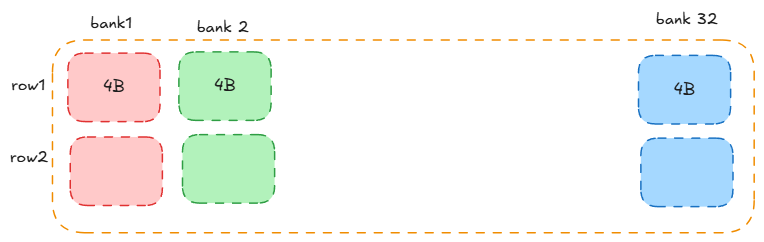
When a thread requests an address, the warp scheduler runs an LD instruction from SMEM. Let’s say we are requesting a float. The PTX instruction would be ld.shared.f32 (notice the change from .global to .shared). This instruction touches all the 32 banks and delivers the result (128B). For the same case, if a thread within this warp were to access a different row of already accessed bank, this would result in 2x 128B cycle. This increase in latency is due to a banking conflict. Remember the rule — all threads must access different banks.
Even though, SMEM have the same physical space with L1 cache, the latency is higher for L1 because a different storage technique. It is good to know but it doesn’t matter to us.
GMEM & Memory Coalescing
GMEM reads memory in sectors. A sector is 32B. Efficiency is the ratio of bytes used to bytes read.
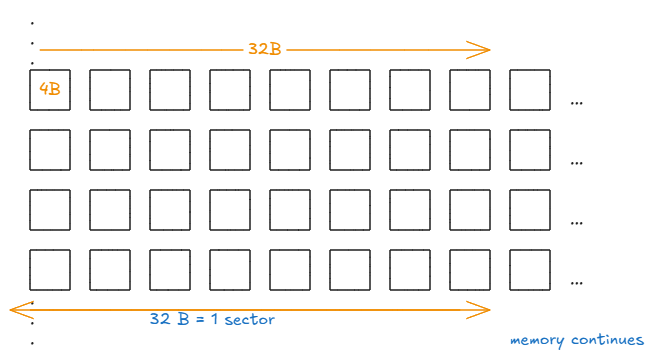
Interestingly, the thread order doesn’t matter. All three codes below have the same latency. Meaning, as long as we use the data read, doesn’t matter if the sequential address are requested by sequential threads or not.

Optimizations of reading data from GMEM throughout the generations—
We will be loading data from GMEM to SMEM. We need data SMEM so multiple warps can access it. And why do we need multiple warps to access the same data? Tensor core. Bingo!!
- Before Ampere:
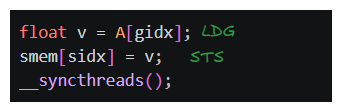
All loads from global memory went through registers (L2→L1→registers). We will keep wanting to hide latency wherever. So, whenever we are loading (K+1)th value into the SMEM, we compute any result using Kth. Somewhat of a consumer-producer loop.
- Ampere :
Ampere introduced cp.async . It goes through GMEM to SMEM without touching registers.
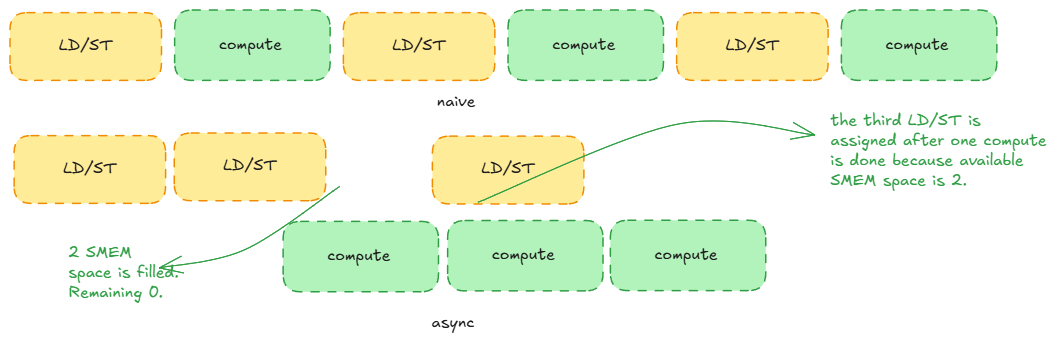
For this case, we have space for 2 chunks of data in SMEM. We fire up 2 load and store instructions. As soon as the first one arrives, we start compute. When the first chunk is computed, we free up space for a chunk and we can fire up another LD-ST instruction. This loop continues. We have replaced two separate LDG and STS instruction with just a LDGSTS. Fewer instructions, fewer overhead. Register space is also not crowded.
- Hopper:
Hopper introduced Tensor Memory Accelerator(the final piece of our puzzle). Unlike, cp.async , TMA doesn’t require per thread indexing and load calls. A single producer thread can handle all loads. Wow!! This reduces instruction overhead significantly. Instead of getting numerous small chunks of data (as in cp.async ), we load huge chunk of data, better bandwidth saturation.
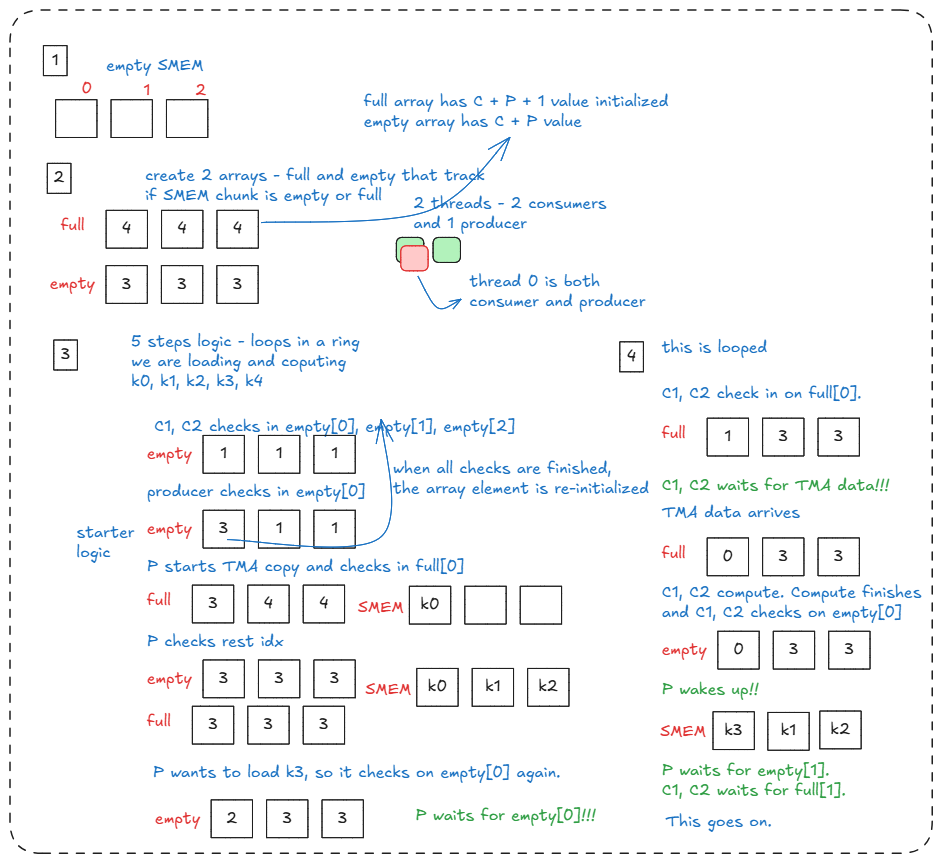
cp.async still has its usage when irregular, small or odd copies of data needs to be accessed. TMA has higher latency for smaller copies due to address generation overhead (that is hidden when chunk is large enough).
Understanding Swizzle
The single metric we have been following is keeping the GPU busy. We had also decided to avoid any inefficiencies due to memory reads to avoid keeping the GPU busy the other way. Let’s look into one such case where we would need to load data from A and B for matrix multiplication.
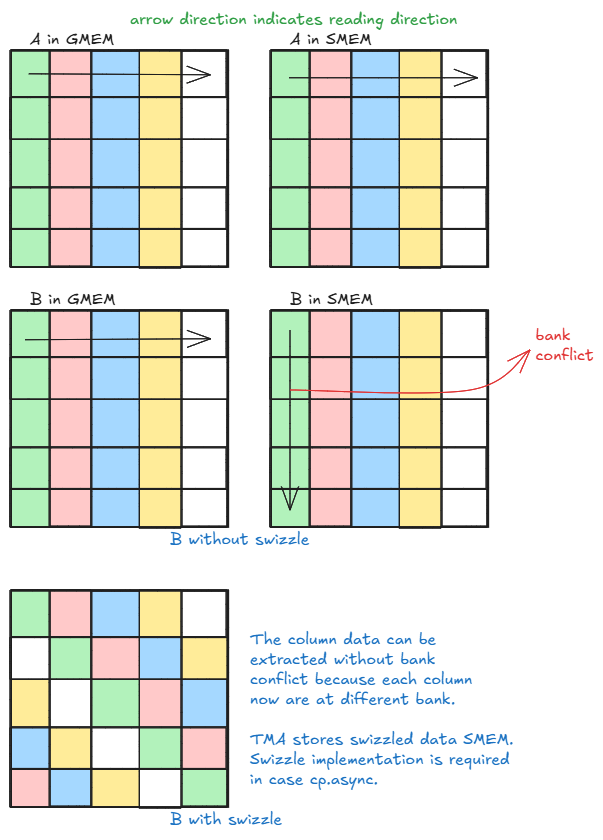
But what if we just transpose the data of B when storing into B? Tensor core has some weird requirement to read the data column-wise. If we do so, we stand to incur tons of bank conflict. That’s a no-no. Swizzle comes to the rescue. Luckily for us, TMA swizzles the data while loading from GMEM to SMEM.
Constraints due to hardware till now
- Maximum threads on a block is 1024.
- Maximum register space usable is 256kb per SM.
- Maximum SMEM is 228 - number of blocks* 1 kb
- The 32 banks
- Global memory 32B sector
The first 3 are inter-connected. For example, you cannot have 2 concurrent blocks of 1024 threads if each block need upwards a total of 128kb. Similarly, having more than 150kb of SMEM would also prevent having 2 concurrent blocks. Having lesser blocks means lesser occupancy. We need to find a balance while using these constrained values.
The compute
Till now, we had our only metric of keeping GPU busy. Now, as we start with compute, let’s introduce another metric — doing as much compute as possible. If we combine both the metrics, we get — doing as much as compute as possible with minimum memory transfers. Mathematically, this would be compute / byte transferred. Perfect.
Roofline Model
Although we have our own metric, there is a performance metric by NVIDIA that is advertised for compute. Peak FLOPs/s = number of SMs * FMA units per SM * 2 FLOP per FMA * clock. This is highest achievable compute we can perform. If we plot our metric with this, we get an interesting graph.
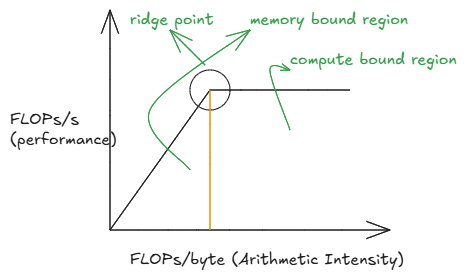
Depending on the FLOPs/s and FLOPs/byte of our kernel, it can be compute or memory bound. Memory bound kernel waits on memory and the execution of compute bound kernel depends on how speed our compute is. We want our kernel to be in the compute bound region (because of the big bucks we pay for compute).
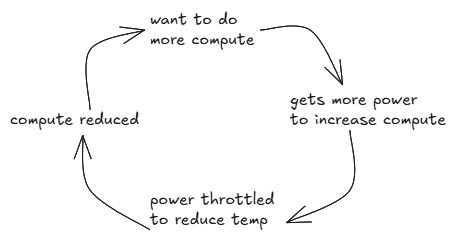
The peak FLOPs/s advertised isn’t always achievable even if we write the most optimized kernel possible. Looking at the Peak FLOPs/s formula might give you some hint. Funnily enough, it’s the clock that stops your GPU from getting the most out of it. Clock isn’t an independent unit. It depends on power. Performing heavy compute pulls in more power and increases temperature of the GPU. There are limits set to throttle power to reduce power consumption and temperature.
Matrix Multiplication
We are multiplying two matrices 32fp, A and B of dimensions M x N and N x K.
Solution 1
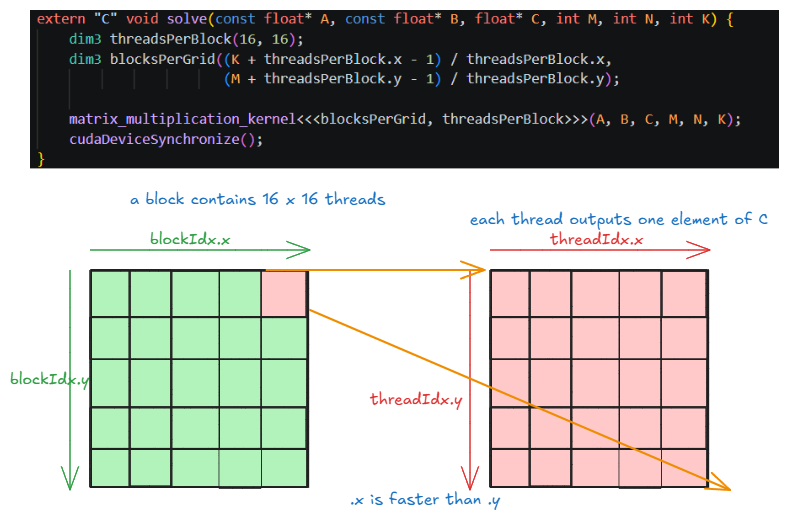
We build up on our previous code. Instead of using a 1d block, we use a 2d grid as well as a 2d block. The choice of block dimension is just to simplify indexing. We are mapping our entire grid onto C. A block of 16x16 threads solves a block of 16x16 C. A 1d block and 1d grid will still perform the same, it’s just that it’s easier to visualize a 2d block mapped onto a 2d output.
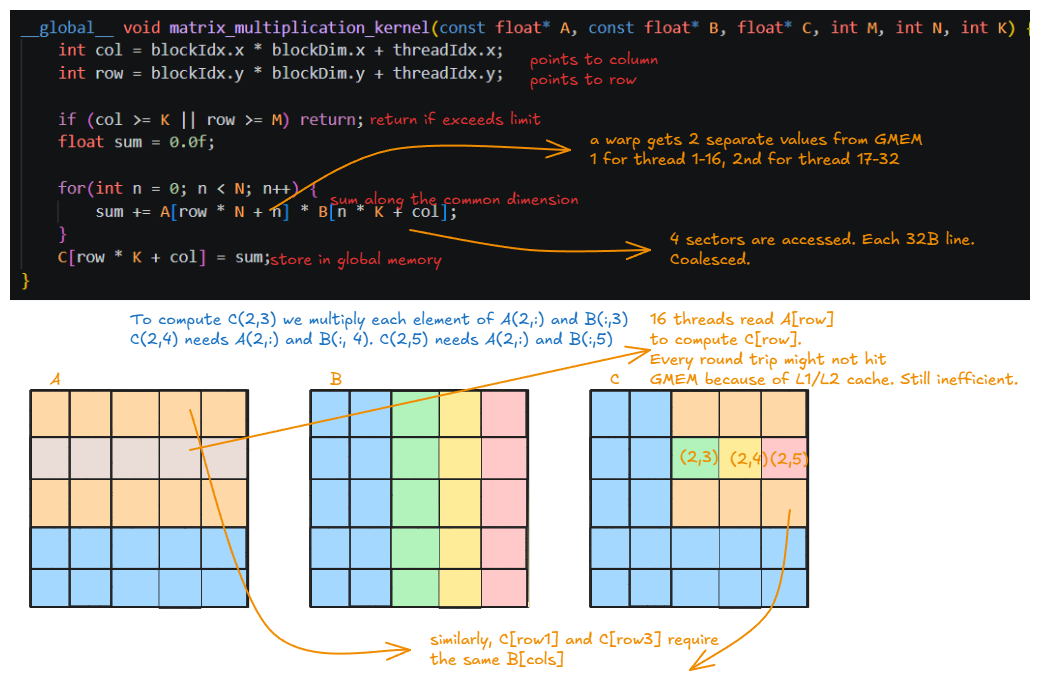
FLOPs performed per thread : 2N (one multiply + one add) Loads per thread : 2N (N for A, N for B) floats = 8N bytes Store per thread : 1 float = 4 bytes FLOPs per byte moved = 0.25 FLOP / byte
In our matrix multiplication, to compute an element of C, we need an entire row of A and a column of B. Check what rows and columns are required by threads that compute C[i,j] and C[i,j+1] . The row required from A remains same. Similarly, C[i,j] and C[i+1,j] would need the same column of B. This observation implies that rows of A and B can be reused!! How? SMEM. Let’s try that next.
Solution 2
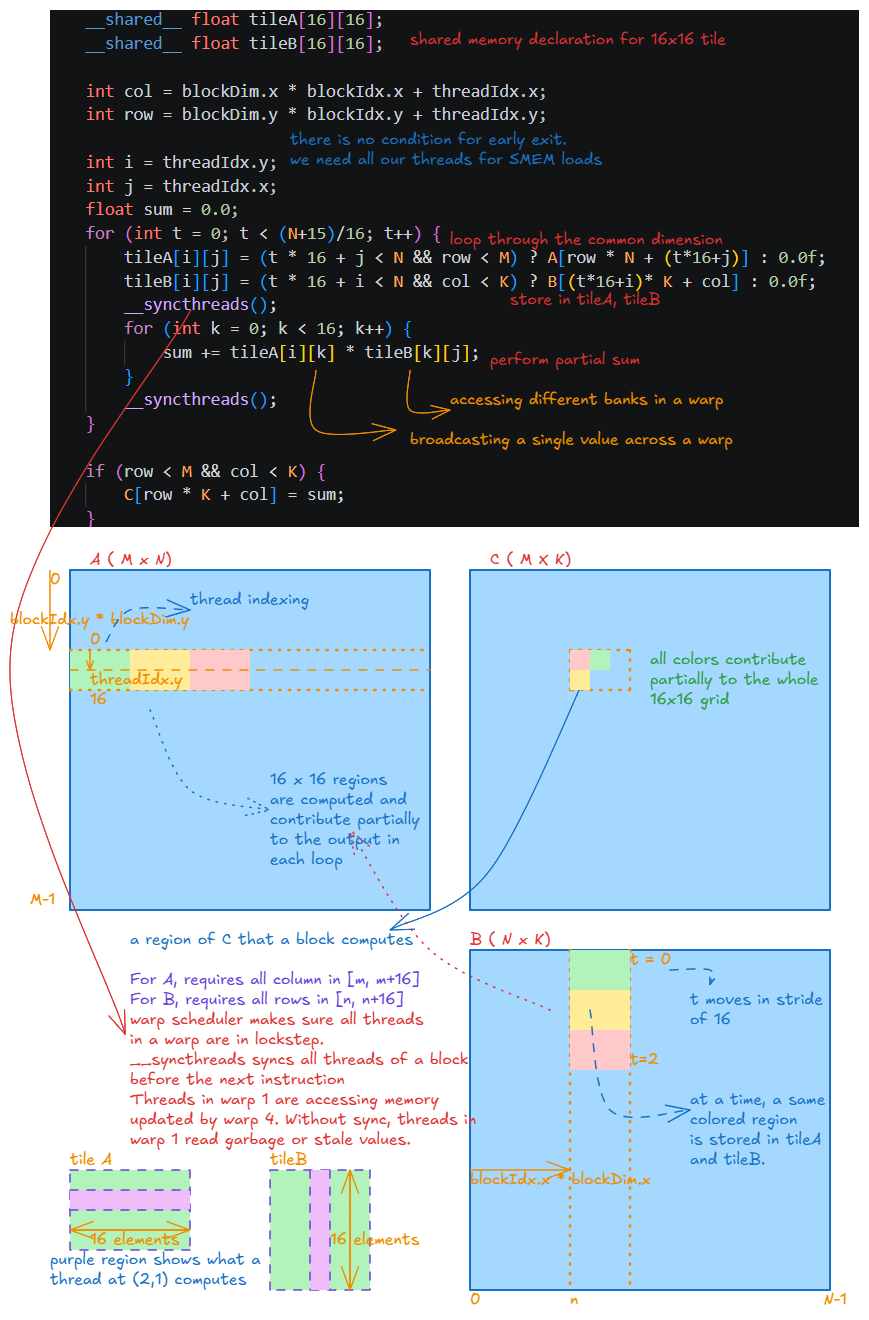
We are starting out by creating two 16x16 tiles of SMEM for A and B. Note that the block dimension matches the tile dimension of SMEM[8]. (We can’t just blindly go about deciding the size of these tiles, we have to look out for occupancy as well, but let’s not concern ourselves with that for now). Similar logic as solution 1 — one block computes 16x16 elements of C.
$\sum_{k=0}^n$$A[i][k] * B[k][j]$ can be broken into $\sum_{k=0}^{n/4} + \sum_{k = n/4}^{n/2} + … + \sum_{k=3n/4}^{n} (A[i][k] * B[k][j])$. Sum of partial sums is equal to the final value. We can use this property along with the 16x16 tile. So, we load 16x16 tiles, perform partial sum, store them in a register. Then, output them. Each thread owns a single row and single column and is responsible only for computing between them.
FLOPs per thread : 2N Total loads per thread : 2 floats * (N / 16) = N / 8 floats = N / 2 bytes Store : 4 bytes FLOPs per byte moved : 4N FLOP / byte
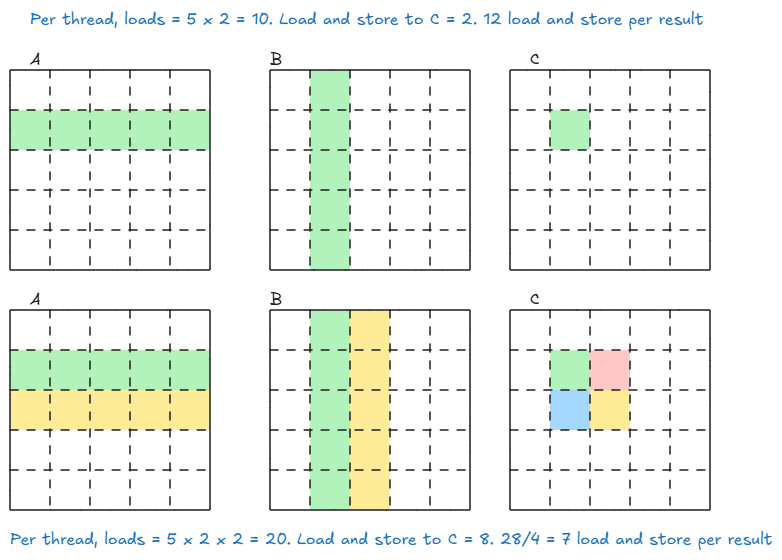
Even with our napkin math calculations we can see 16x improvement. What happens we try to compute more than one result per thread?
Solution 3
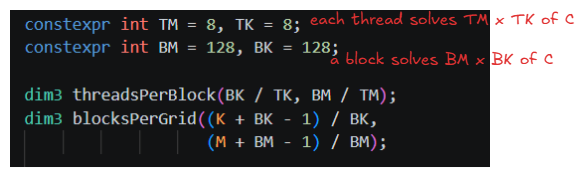
Instead of each thread solving for a single element, each thread now solves a region of TM x TK.
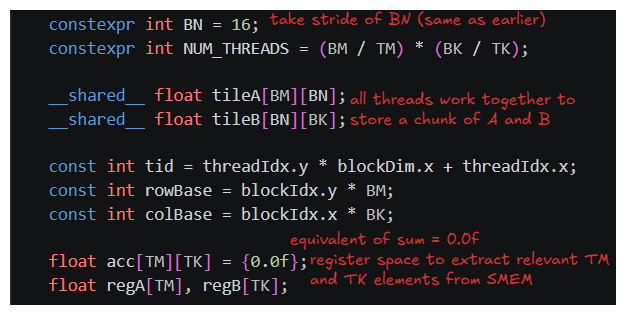
We increase the SMEM space to fit our chunk. We will still opt for our partial sum technique. Now, we would need an accumulator of TM * TK instead of just 1.
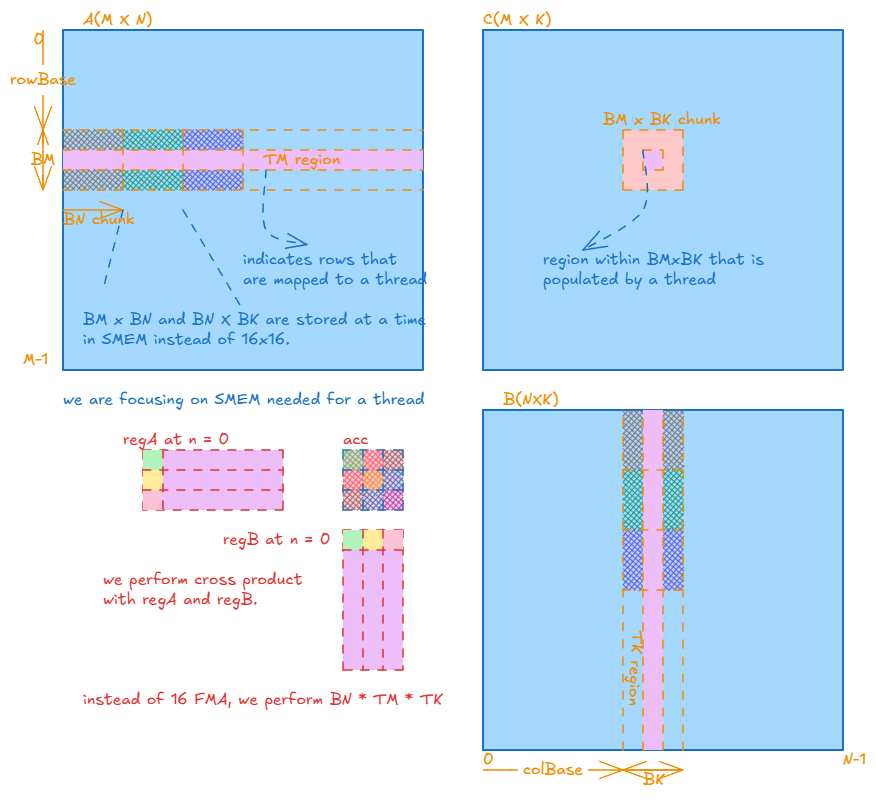
The logic remains fairly same. Instead of performing partial sum across 16 elements, we perform partial sums across TMx16 and 16xTN elements. Now, each thread owns a TM rows and TN columns region and needs to compute a partial sum of TM x TN region.
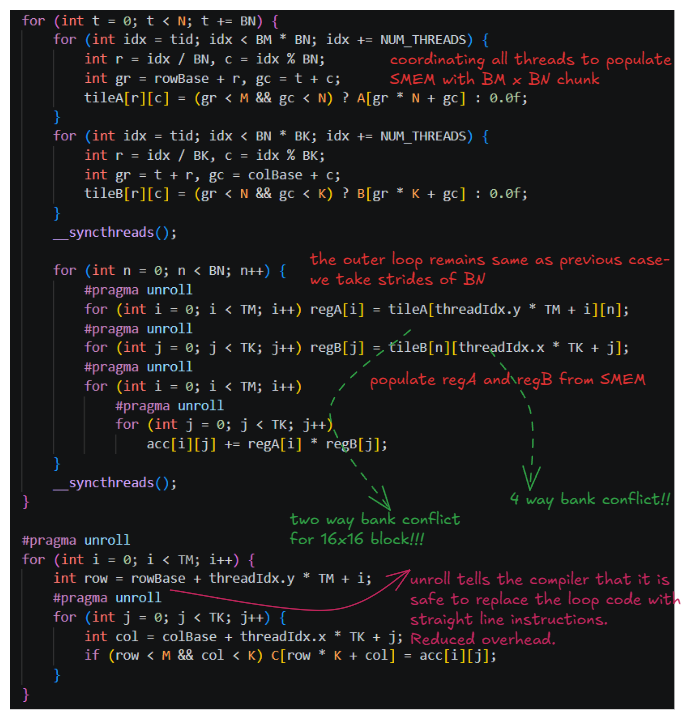
Global loads per iteration: A tile 128 x16 + B tile 16 x 128 = 4096 floats = 16 KB Total FLOPs across block per iteration = 2 * 128 * 128 * 16 = 524288 FLOPs/byte = 32 FLOP / byte
Another 8x improvement. We don’t need to go far to look for our next improvement. While loading tileA and tileB, we face bank conflicts. Solving those would give us another chunk of performance.
Solution 4
Referring to Simon’s blog, he experimented with solving the bank conflicts but ended up with slower kernels. Instead, what gave him further optimization was vectorized loads.
Now is a good time as any to discuss some optimization that compiler prefers. Compiler prefers fewer overhead and fewer instructions to be more optimized. Seems intuitive enough. Currently our loads from SMEM for regB are continuous. Compiler sees this and replaces LDS.32 (load 32 bits from shared memory) to LDS.128 (128 bits is the highest compiler can get at one go). 4 instructions are replaced by one. Loads for regA aren’t continuous and hence are stuck with LDS.32 . We can rectify this by —
__shared__ float tileA[BN][BM];   // was tileA[BM][BN]
for (int i = 0; i < TM; i++) regA[i] = tileA[n][threadIdx.y * TM + i];
The loads from global memory for both tileA and tileB are still LDG.32 for each thread. We solve this by using float4 loads.
For B it is straightforward because there is no transpose action going on.
float4 v = (gr < N && gc + 3 < K) ? *reinterpret_cast<const float4*>(&B[gr * K + gc])
                                  : make_float4(0.f, 0.f, 0.f, 0.f);
*reinterpret_cast<float4*>(&tileB[r][c4 * 4]) = v;
For A, we have just have to store the elements separately after the load
float4 v = (gr < M && gc + 3 < N) ? *reinterpret_cast<const float4*>(&A[gr * N + gc])
                                  : make_float4(0.f, 0.f, 0.f, 0.f);
tileA[c4*4 + 0][r] = v.x; tileA[c4*4 + 1][r] = v.y; tileA[c4*4 + 2][r] = v.z; tileA[c4*4 + 3][r] = v.w;
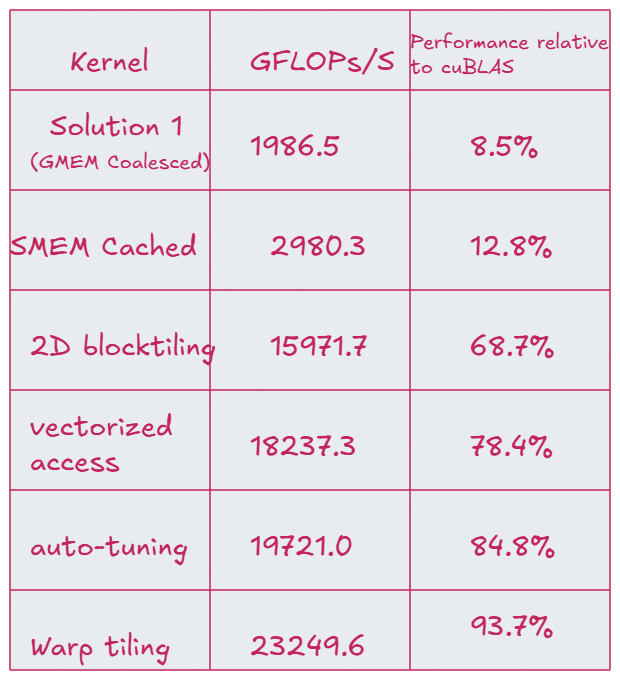
Numbers taken from Simon’s blog for A6000 GPU
We seem to have got a near 70% of cuBLAS[9] with our solution 3. Vectorized access gives another 10%.
Profiling, tools & Auto-tuning
So, how did Simon find these numbers? NVIDIA provides a set of tools for us. Let’s go through one such process.
Anytime we solve a problem, we do some napkin math to see what hyperparameter (block size, register and SMEM sizes) are good enough. Using —-ptxas-options=-v while compiling dumps these values for our kernel. Additionally, it also tells us if there are any spillage of memory. Once we are happy with this, we can go on to compute the FLOPs by simply calculating the number of multiplies and adds our kernel perform. Using cudaEvent_t objects we can mark when a kernel start and stops executing in our code and hence, print the elapsed time. Dividing FLOPs with time, we get the metric that Simon had calculated. Sometimes, the time taken for the kernel can be random (clock cycle varies due to power throttling or temperature). We can check these resources using nvidia-smi . This ensures, we are not mistaking some random power effects to optimization.
More often than not, there are cases where we should have some optimizations theoretically but miss it when kernel runs. In these cases, we can profile our kernel using NVIDIA Nsight Compute. Nsight Compute tells us all the whys. We can check memory workload, warp statistics, compute-bound or memory-bound nature, roofline chart, PTX and SASS. It has lots of other features that can be looked up when you still puzzled.
With these tools, we can run our kernels with varying hyperparameters (for our case — BK, BM, BN, TM, TK) and measure the performance. Finding the correct hyperparameter combination often gives a good chunk.
Other optimizations
There are some other optimizations that we can perform still.
1)Looking out for Instruction Level Parallelism —
Whenever a warp stalls, we rely on our other warps to do latency hiding. Threads can also do some kind of latency hiding. Let’s take an example case. A FMA takes 4 cycles. This doesn’t make it hog the CUDA core for the entire 4 cycles. The process is broken down to little phases and each phase is executed by different parts of a CUDA core. So, we can queue similar instructions to our CUDA cores if they don’t depend on this output. This free of dependency nature reduces our latency from 8 cycles to just 5 cycles. So, what is better? Warp switching or ILP ? A combination of both.
2)Warp tiling —
Let’s look our solution 3 again. Every next thread gets a element separated by a stride 8 with regB. This could be improved if we re-align explicitly how each thread assess an element.
Now, each block solves BM x BK, so we would have 8 warps. Defining explicitly allows us the shape and ordering of our warps
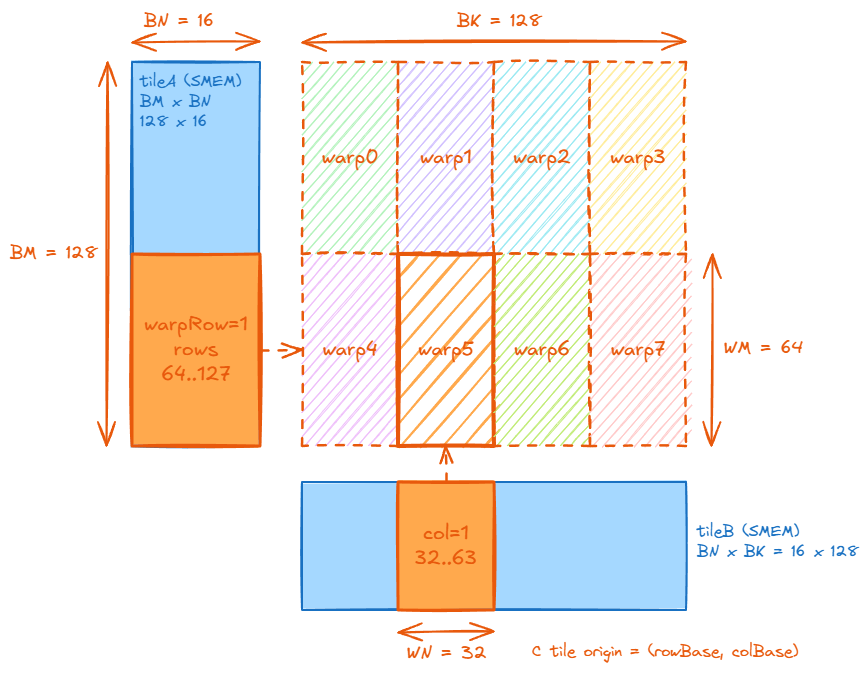
We will further break this chunk that this warp covers to be a 2x2 tiles, each of size 32x16. Each warp has 32 threads. So, in this 32x16 sub tile, each thread solves 16 elements. Across, 2x2 tiles, it ends up solving 64 elements — same as solution 3. Again, the layout of this 16 elements could be explicitly declared in our code. We will stick with a nice 4x4.
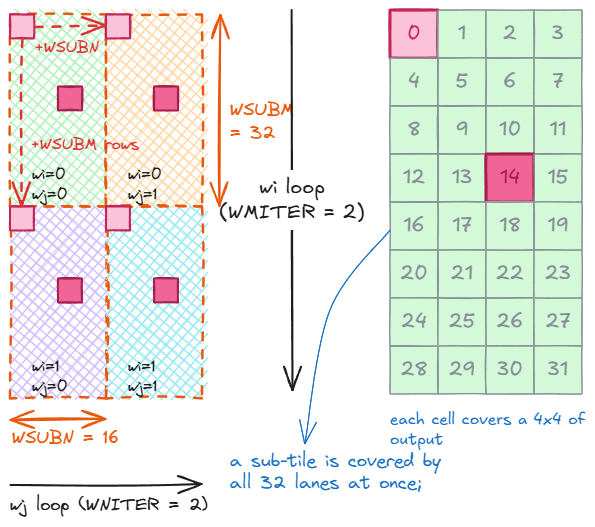
So, each of this pinkish shaded region solves 4x4 chunk of C. Now, let’s look into what lane 14 does.
For lane 14, r = 3 and c = 2. This has a 4x4 block of C. Therefore, the indexing for rows : r4 .. r4 + 3 = 12 to 15. cols : c4 .. c4 +3 = 8 to 11. These indices correspond to the darker pink in the green region. We need tileA[12..15][n] and tileB[n][8..11] from SMEM to load into regA and regB . Lane 12, 13, 14 and 15 need the same regA values, so it’s a 4 way broadcast and regB has a 8 way broadcast with the 2,6,10,14,18,22,26 and 30 lanes.
For regB, we need to load 4(values from each tile) x 4(number of columns) = 16 floats. For regA, we need to load to load 4 (values from each tile) x 8 (number of rows) = 32 floats.
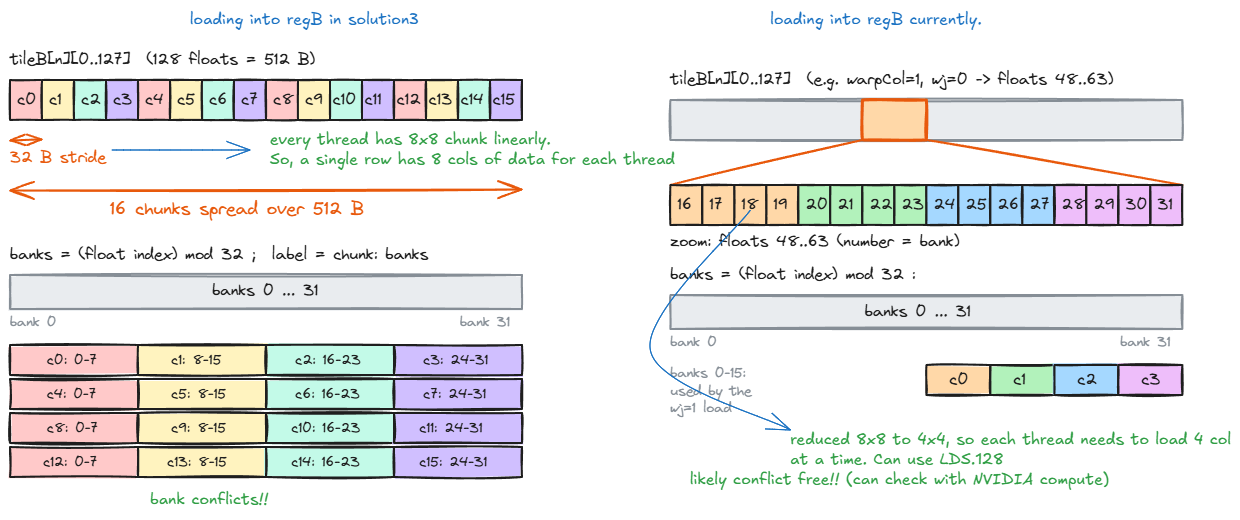
3)async loads (or TMA) and Tensor Cores —
We have already discussed how TMA and async loads work. Tensor core are nothing special. Our logic remains same till loading into SMEM. Next, instead of loading from SMEM to register and performing FMA, we will utilize tensor cores that need matrix descriptors (starting address, strides, offsets, swizzle mode, etc) and the results accumulates into registers.
Flash Attention
The reason I started out with CUDA was attention. I remember reading about quantization, watchin videos, reading blogs about flash attention. I was fairly adept in understanding attention mathematics (and I hope you do too before reading the following) but I could never make sense out flash attention. Later on I realized the reason was very simple. I was kind of trying to put the cart before the horse. Reasoning why flash attention works before you have a good mental model about how GPU works is criminal.
We need to compute $softmax(\frac{QK^T}{d})V$. Q is M x d, K and V are N x d. We perform $O =Q K^T$which is of M x N dimension, take SoftMax and then we do MatMul between S and V getting M x d results. The problem with computing the entire S and then doing the MatMul is adding lots of latency due to store and loads from GMEM. Our earlier Matrix Multiplication problem could be easily parallelized because of the partial sum property. Having a SoftMax ruins that.
Let’s remove SoftMax for now and check whether we can get away with just one load from GMEM.

Let’s parallelize over M. Each blocks deals with just producing one row of output. To compute S for a row, we still need the whole of K and V. Perform dot products between the (blockIdx.x) qth row and each of K rows produce a row of S. But, storing this intermediate S is still costly. 128KB register for our block gives us a window for just 32 floats. So, let’s try to compute the final result without storing this intermediate.
Let’s see how qth row and kth row contribute to the output. We have just one out of N values. Let’s call it s. Ultimately, the S(1 x N) does a matrix multiply with V (N x d) to get O (1 x d). So, one value of S(s) just multiplies with kth row and contributes partially to the output.
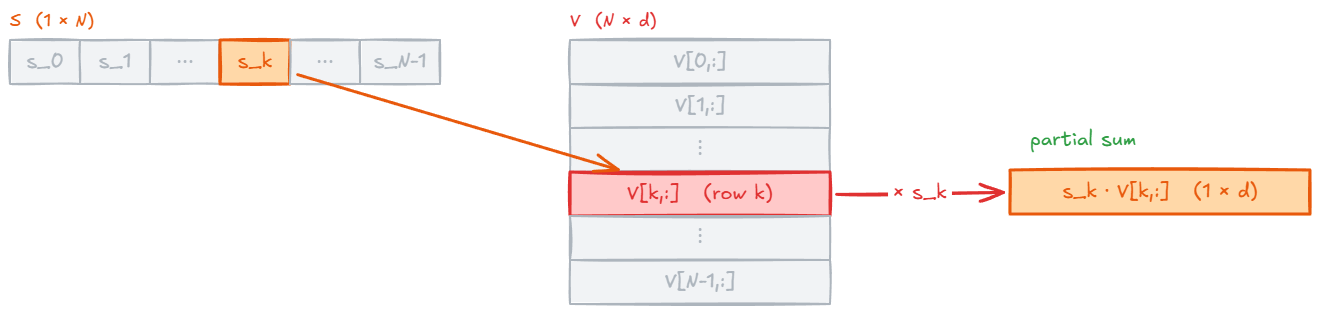
Now, let’s introduce SoftMax again. Now, partial outputs becomes difficult (or impossible) because SoftMax of a s needs the sum of the entire S. Bummer!!
Flash attention builds on top of online SoftMax that can compute the SoftMax in a single pass. Let’s look how:
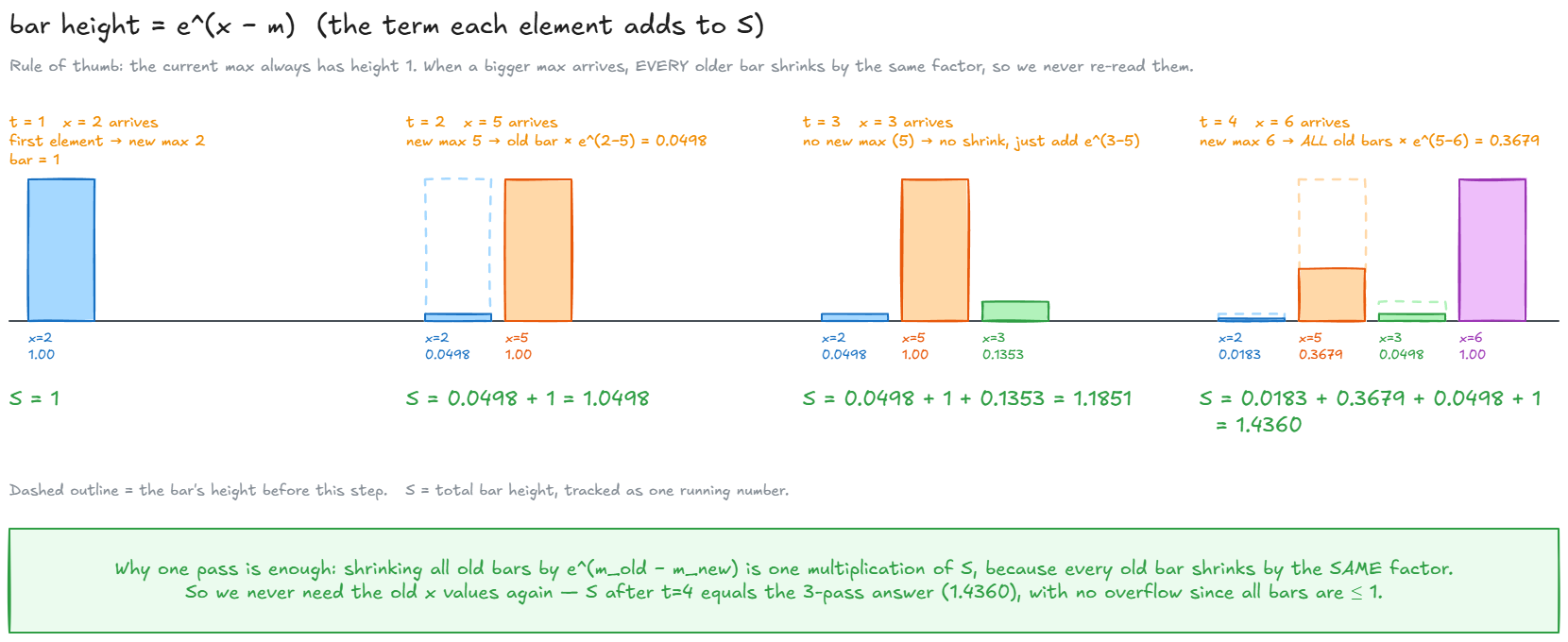
Flash attention uses this along with techniques to optimize efficient transfer and compute. A naïve solution looks like this —
__global__ void flash(const float* Q, const float* K, const float* V, float* output, int M, int N, int d) {
    int i = blockIdx.x;
    int j = threadIdx.x;

    __shared__ float q[128]; // d is fixed at 128 for our prodblem

    if (j < d) {
        q[j] = Q[i*d + j];
    }
    __syncthreads();

    float local_max = -FLT_MAX, local_sum=0.0f, local_output[128] = {0}; // each output contibutes partially to a d-dimension
    float scale = 1 / sqrt(d); // do this once because division takes higher cycles

    // the online softmax + the attention calclation for a thread
    int jj = j; // every thread does N / blockDim.x QK FMA
    while (jj < N) {
        float score = 0;
        for (int k = 0; k < d; k++) {
            score += q[k] * K[jj * d + k];
        }
        score *= scale;
        float new_max = fmax(score, local_max); // normalizing locally ( within Ks that
        float correction = exp(local_max - new_max); // this thread is responsible for)
        local_sum = local_sum * correction + exp(score - new_max);
        for (int k = 0; k < d; k++) {
            local_output[k] = local_output[k] * correction + exp(score - new_max) * V[jj * d + k];
        }
        local_max = new_max;
        jj += blockDim.x;
    }
    // now we find the max and sum for the entire block
    int warp = j / 32;
    int lane = j % 32;
    // first find the max and sum for each warp
    for (int z = 16; z >= 1; z /= 2) {
        float other_max = __shfl_down_sync(0xffffffff, local_max, z); // gets value from (threadIdx.x + z)th thread
        float other_sum = __shfl_down_sync(0xffffffff, local_sum, z);
        float new_max;
        if (lane < z) { // correction logic
            new_max = fmax(other_max, local_max);
            local_sum = local_sum * exp(local_max - new_max) + other_sum * exp(other_max - new_max);
        }
        for (int k = 0; k < d; k++) { // rescale the output
            float other_output = __shfl_down_sync(0xffffffff, local_output[k], z);
            if (lane < z) {
                local_output[k] = local_output[k] * exp(local_max - new_max) + other_output * exp(other_max - new_max);
            }
        }
        if (lane < z)
        local_max = new_max;
    }
    // we end up with 32 (number of warps) sum, max and output in our lane 0
    // reduce them to 1 as well.
    __shared__ float t_max[32], t_sum[32], t_output[32][128];
    if (lane == 0) { // store the lane 0 values in SMEM so all thread could access
        t_max[warp] = local_max;
        t_sum[warp] = local_sum;
        for (int z = 0; z < d; z++) {
            t_output[warp][z] = local_output[z];
        }
    }

    __syncthreads();
    for (int z = 16; z >= 1; z /= 2) { // correction logic
        if (j < z) {
            float new_max = fmax(t_max[j], t_max[j+z]);
            t_sum[j] = t_sum[j] * exp(t_max[j] - new_max) + t_sum[j + z] * exp(t_max[j+z] - new_max);
            for (int k = 0; k < d; k++) {
                t_output[j][k] = t_output[j][k] * exp(t_max[j] - new_max) + t_output[j+z][k] * exp(t_max[j+z] - new_max);
            }
            t_max[j] = new_max;
        }
        __syncthreads();
    }
    // we end up final values in our threadIdx.x = 0
    if (j == 0) { // store it to output
        float scale = 1 / t_sum[0];
        for (int k = 0; k < d; k++) {
            output[i * d + k] = t_output[0][k] * scale ;
        }
    }
}
After we perform a local run through all the Ks and Vs, we have partial values across all our threads. We need to reduce them to one.
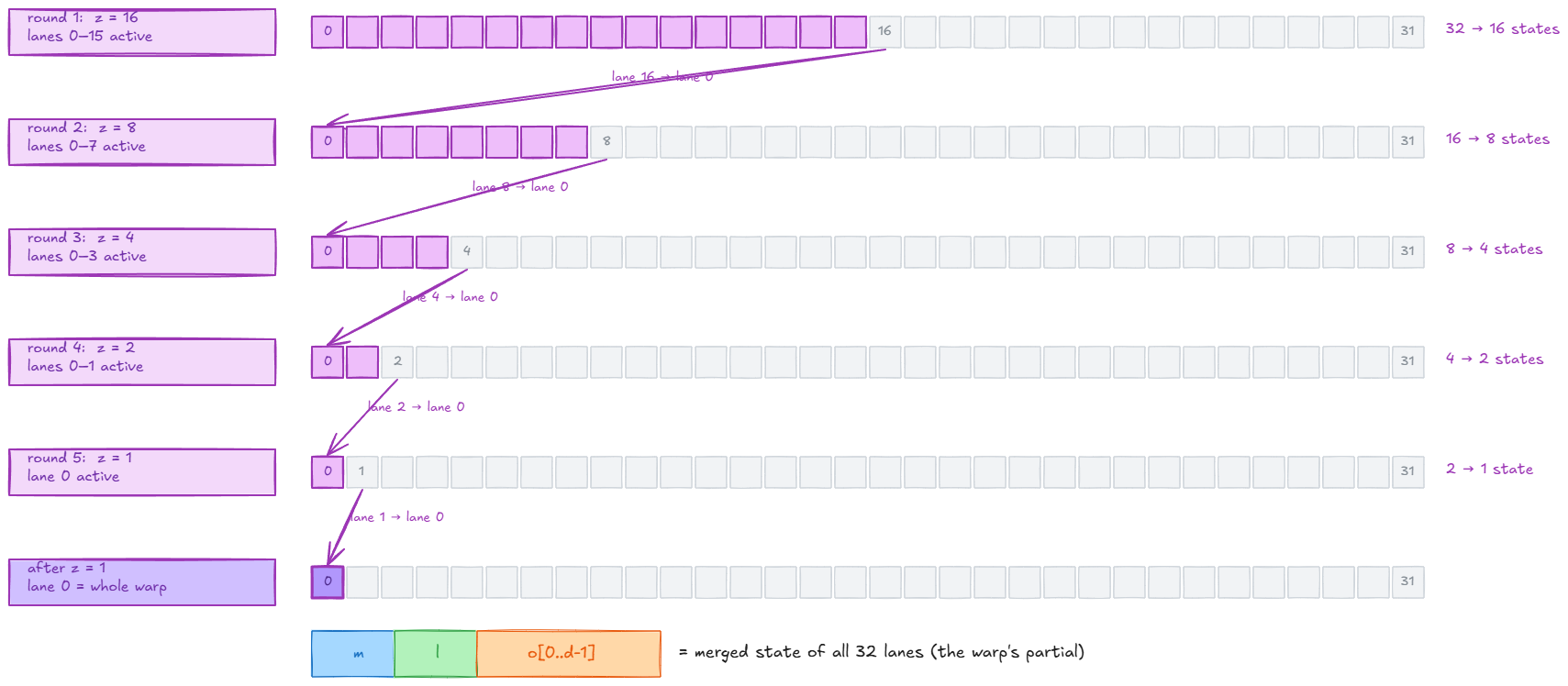
__shfl_down_sync() gets us a value from the same warp and we reduce as shown. Warps are in sync, so we don’t need __syncthreads(). This part is significantly faster than the next reduction.
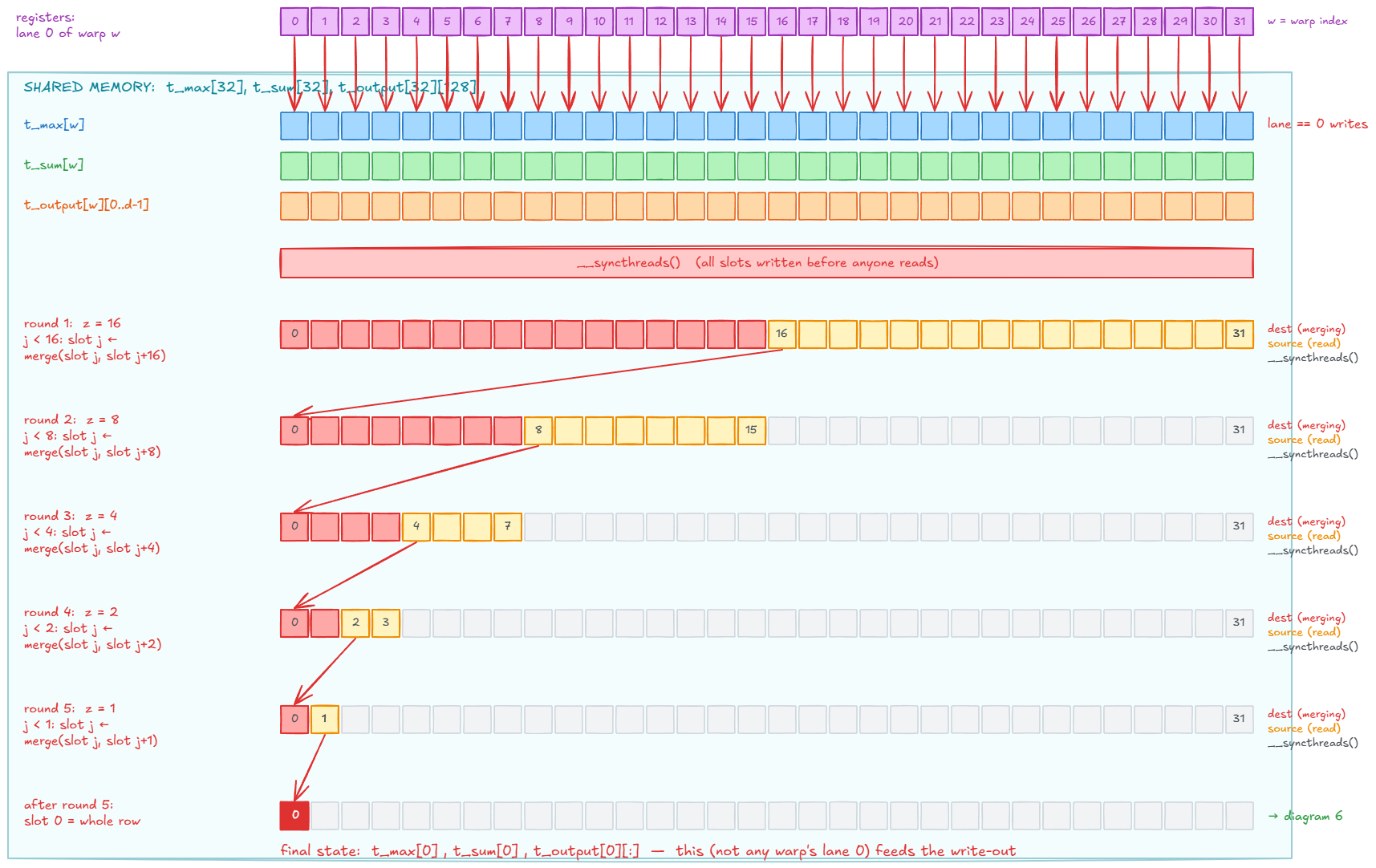
Again, we need to reduce the values from lane 0 of all the warps. Essentially, our problem is a combination of online SoftMax and reduction. There are significant optimizations that still can be done. I have written step-wise improvements of this kernel which you check it out here.
Let’s discuss optimizations in the forward pass across flash attention generations —
- FA1 : They were the one who laid the foundation about memory traffic being the concern in attention. They suggested tiling, fusing matmul and softmax into a single kernel.
- FA2 : FA1 made the kernel IO efficient but reached only a fraction of peak FLOPs/s. FA2 introduces better parallelism across sequences, batches, and heads.
- FA3 : They were introduced with Hopper generation. So, they demonstrated using TMA and WGMMA. Better scheduling techniques with async loads.
Reduction
Our attention problem introduced another interesting space where we can optimize further. Summing a vector, finding minimum, maximum, sorting, all require reduction. Luckily, we have a very cool and exhaustive resource. I will refer to the PDF and reason why each solution is improvement upon the other. I would also like you to visualize how each thread in the block works (use pen and paper if you need to). Strong visualization skills come in handy to understand kernels and think of optimizations.
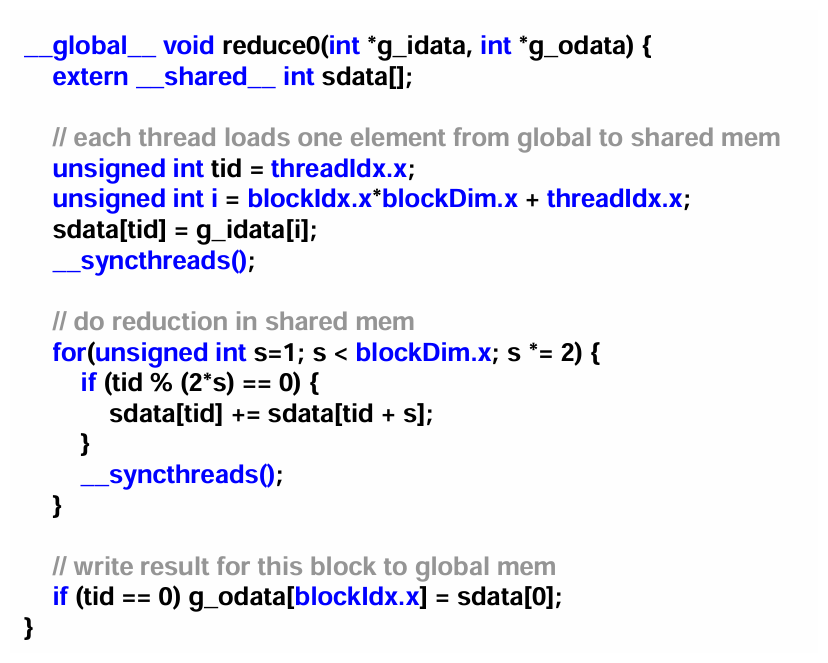
Each thread loads an element into SMEM. Each thread executes only if it is multiple of 2*s. One first loop : 0, 2, 4,…,1024. Second loop : 0, 4, ..1024. For, s=512 : 0th thread and we have reduced. Remember about warp scheduling as well as bank access in SMEM — bad SMEM access pattern and threads required halves every loop but the active warps remains same due to bad indexing. Additionally, operators like % and / divide are slower.
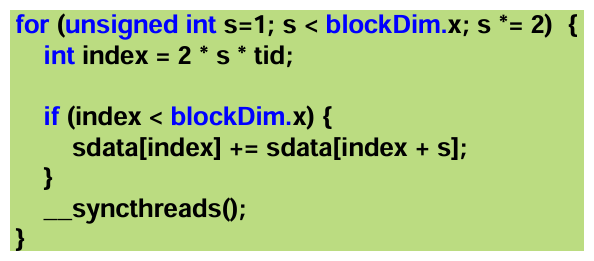
We have replaced the reduction loop now. Different branch condition using multiplication operator. For s = 1, first 512 threads are active and add their next elements. For s = 2, we again half the number of active threads and add the elements at s distance. We solve the warp scheduling problem with this — every time we half the number of threads required, they are sequential threads. Hence, we need half the warps required. Still, the access pattern from SMEM is unoptimized.
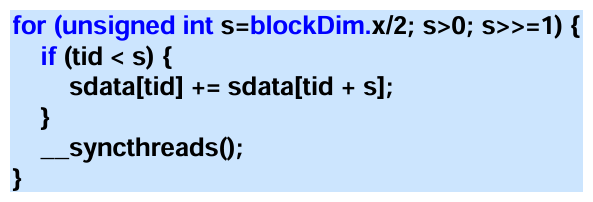
We reversed the indexing of he loop and the address indexing doesn’t jump for each consecutive thread. For s = blockDim.x / 2, we have 512 active threads and each warp accesses a continuous SMEM row. Now, that we have solved the indexing problem for better warp management and SMEM access, we need to think about the idle threads that increases x2 every loop.
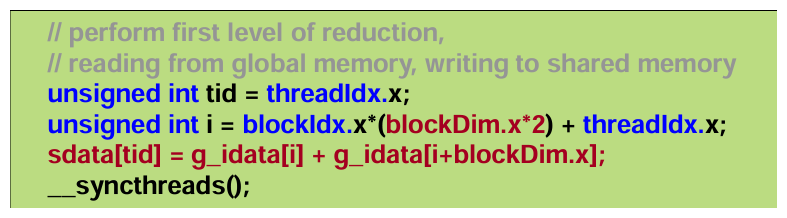
We perform a reduction during load itself and reduce the number of blocks required. Lesser blocks == lesser idle threads. If we look at the kernel, it is obvious that this is a memory bound problem (there is just addition operation and we are loading from GMEM). The author ran the profiler for this kernel and found that still we are not reaching maximum memory bandwidth, which suggests that further speedup can be done by helping our compiler a little. When we are left with only a single warp, we can avoid __syncthreads() and using if conditions. This is where we deviate from the PDF(it is based on a older geneartion hardware).
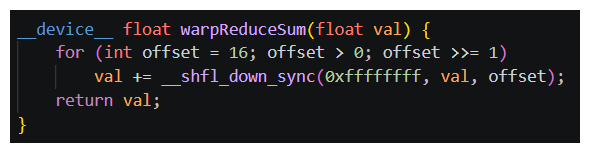
We had discussed __shfl_down_sync() . It gets a value (stored in registers, not SMEM) from a thread at an offset .
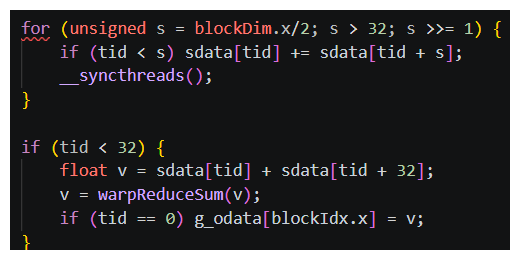
We avoid overhead of having 5 more iterations of the loop and __syncthreads() .
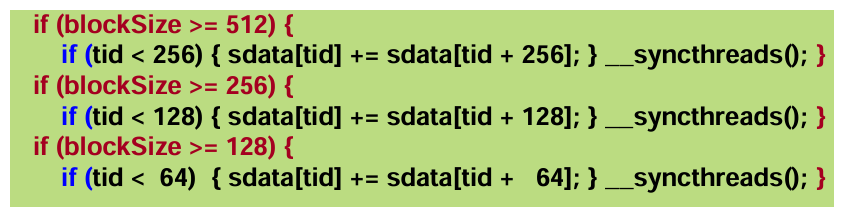
We can unroll the remaining loops as well because we know the block size. Why would this help? Lesser compiler overhead, because the compiler doesn’t need to track of the loop, it’s condition, etc. You can always profile your kernel to be completely sure. So, in the end we performed two kinds of optimizations — first improving our algorithm, then look for code optimizations for our improved algorithm.
Some random optimizations
- There are
__fmaxfandfmaxfwhich both compute floating point max, but__fmaxfis faster with lower accuracy. - Use signed over unsigned integer values in loop indices. Signed overflow isn’t defined so, compiler always thinks that your index will never overflow. For unsigned, compiler has to be prepared for overflow — extra overhead.
- Use unsigned for division or modulo — the reverse.
- Avoid runtime divisions if possible. They are slower than constant divisors.
Let’s look at some PTX (optional (Not really!!))
We will look at the PTX of our first 2 solutions of our matmul kernel and try to understand how PTX are arranged, how optimizations change their structure, etc. Don’t force yourself to understand each and every line of the PTX. Generally, you only look at the part where you have done optimization to ensure your optimizations landed. Let’s not get freaked out by these symbols.
Kernel 1 :
How to go about even reading this? Start from the very beginning. When you come across a new command, understand what it does. A chunk of instructions will be equivalent to one line of code, let’s start with identifying those chunks. When you come across a branching instruction, assume it being true and look at what it does. Then, come back again and start reading it sequentially. Keep noting what each register had stored. Eventually, all of it would make sense.
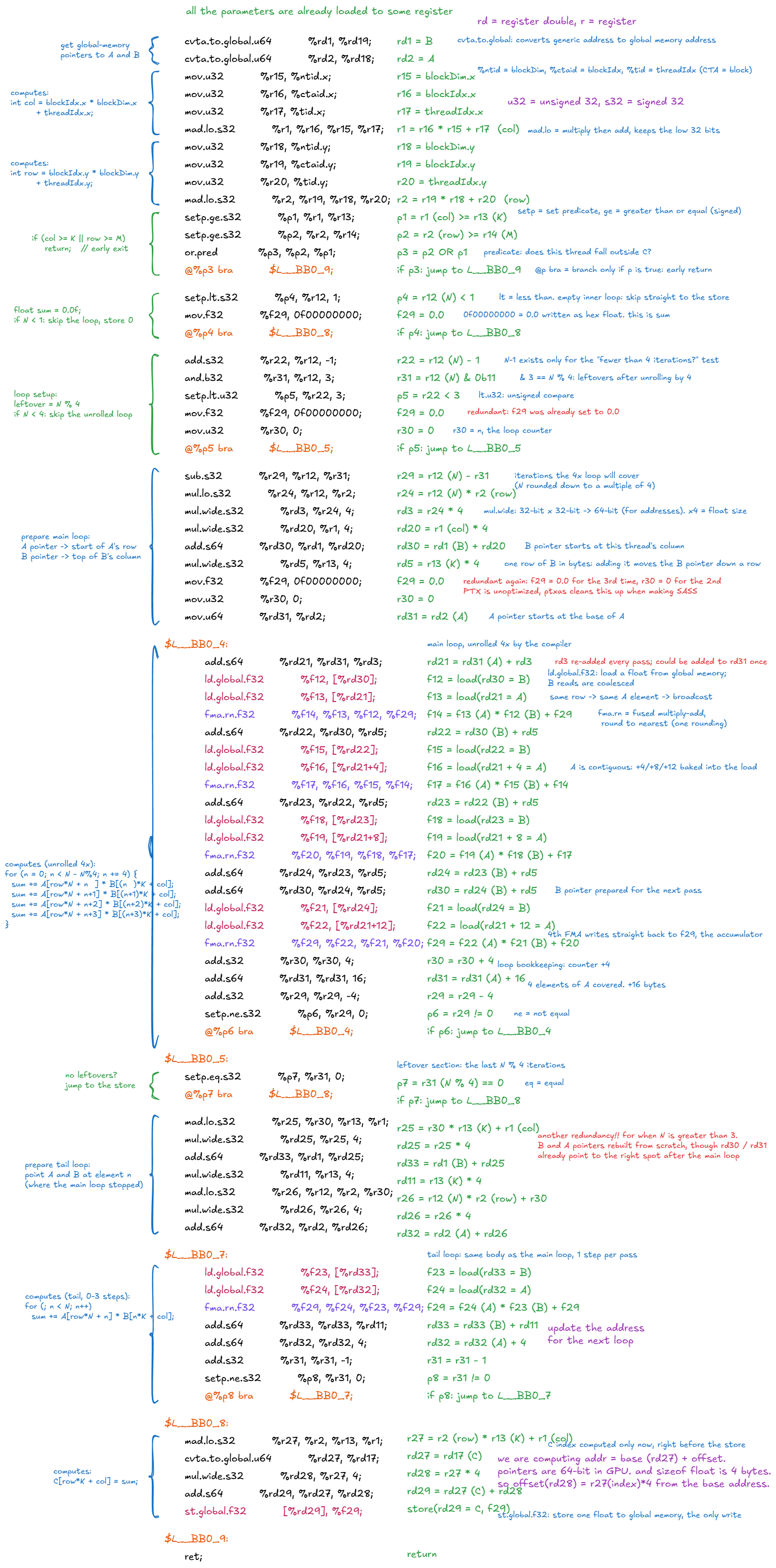
You must have noticed no registers are being reused. This would seem counter-intuitive as compiler should be max-optimized. This is because PTX is a virtual instruction set. Its virtual nature lets free use of new registers.
Kernel 2 :
This new kernel should be easier to read if you got the hang of the first. A trick that I find useful when reading these is separating compute with load/store. I don’t try to understand indexing once I get to the compute part. I focus on the indexing on the initial stage and after the compute where it is updated, to see how it is updated.
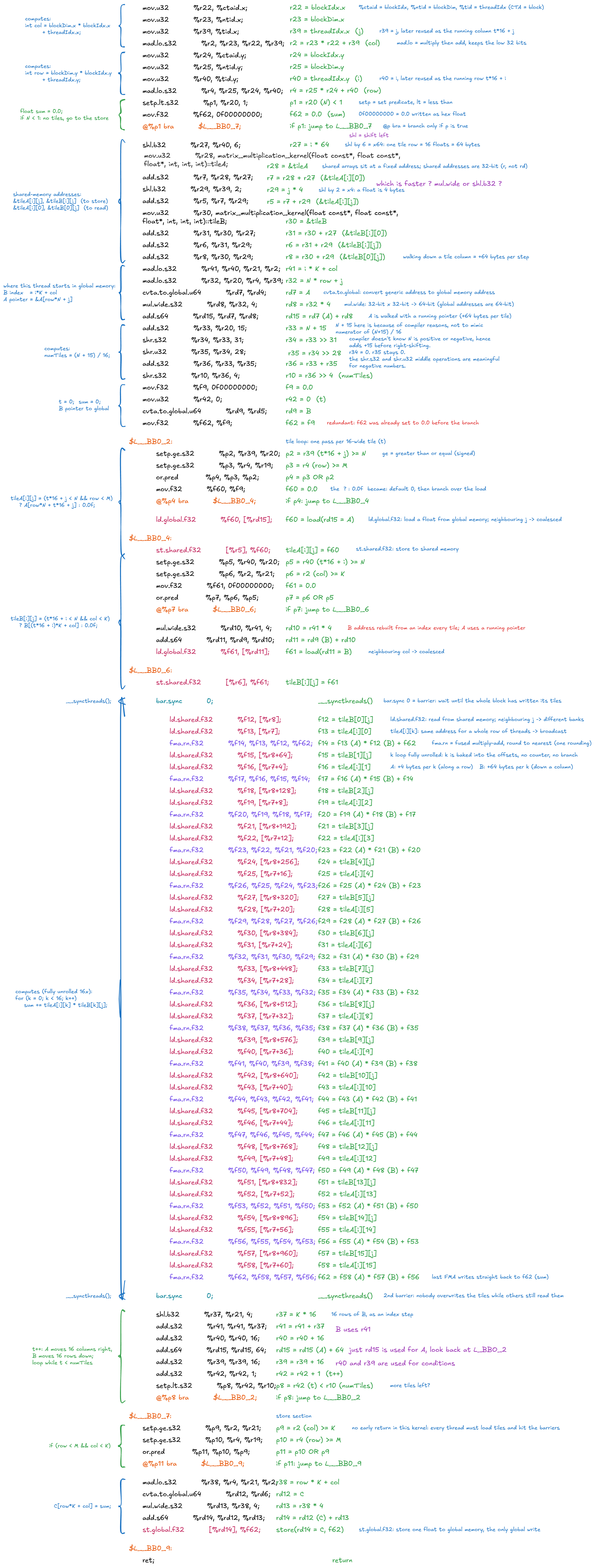
One fun thing I learnt from looking at both of these codes is global addresses are 64-bit but shared memory addresses are just 32-bit.
Notes
[1] Chip manufacturing produces a very non-deterministic defects across the fabric. Instead of discarding the entire component, they are sold as older version or as an inferior variant. Interestingly, sometimes some components are purposely turned off to meet the advertised number. Both the variants have different number of total SMs, i.e., some GPC has fewer than 9 TPCs. ↩
[2] A thread is a single unit of program execution. ↩
[3] They are in lock step if their starting states are same or if they are not executing any divergent (branching) code. Earlier generations had a single program counter(PC) for all threads in a warp unless they were divergent. Newer generations (since Volta) provides PC to every threads. ↩
[4] A clock cycle is a unit of time measurement of a processor. ↩
[5] Why and how these 4 warps coordinate isn’t documented by NVIDIA. ↩
[6] DRAM are smaller in physical size but has certain properties that are detrimental for them to be used as on-chip memory. The reads are slow even on the same die. Needs refreshing to sustain data. Leaks data. Read destroy the value stored, adds overhead. ↩
[7] The 32 banks pose an interesting memory constraints. The SMEM can only be of the order of 128B. Whatever dynamic SMEM you request, compiler gives you the next multiple of 128B(not the actual next multiple, some predefined multiple). ↩
[8] It is imperative that we give equal work to all our threads. So whenever possible, we need to make sure that the total count of SMEM elements is a factor of total threads in our block. ↩
[9] cuBLAS is the BLAS (Basic Linear Algebra Subprograms) implementation by NVIDIA. It shows practical ceiling of performance achievable. ↩
Some blogs that I liked
- Transformer Inference Arithmetic — kipply’s blog
- How to Optimize a CUDA Matmul Kernel for cuBLAS-like Performance: a Worklog
- Defeating Nondeterminism in LLM Inference
- Aleksa Gordić — Inside NVIDIA GPUs: anatomy of a high performance matmul kernel
- Outperforming cuBLAS on H100: a Worklog
- All About Transformer Inference — How To Scale Your Model