Web technology is still very deep. AI solving code doesn’t change that. It give a satisfaction to understand how these beautiful technology works. Scaling this technology, taking innovative strides still require you to understand your code through and through. Let’s start from the very beginning.
Bit by bit
On the very base of web technology lies information manipulation and transfer. Transistors were invented to store charge which is equivalent to store data. Then, we could perform operations by using various combination of transistors and gates.
Every operation is just a combination of addition and shifting the bits around.
Now we store them
Although we use transistors for data manipulation, storing it is a different engineering problem. Transistors loose energy over time, hence data. We manipulate electrons and spins to store data. The engineering that goes into this is deep enough to have its separate blog. HDD and SSD are the two types of hard disks that different in their engineering, hence their storage capacity, speed, durability.
Good visualization on how these work:
Manipulating some bits
Having data isn’t enough. Raw data will seem similar to human and computer alike. One needs to tell the computer the data is of an image, audio, video or some file. These data needs to be changed according to what format it belongs to. We have program that manipulates these to our desired values.
We have a program and the data, but we are missing the architecture that performs what the program intends. Enter CPU and RAM.
CPU then does these : Fetch data from drive. Figures what the program mean in simple mathematical operations. Do those operations. Write it back.
RAM is the space where the data of program, retrieved, intermediate calculations stay.
When the program is being handled by the CPU, it is called a process.
Why do we need RAM when we already have HDD/SSD? Remember Control logic unit, arithmetic logic unit from childhood days, how do they come into picture in this process?
So, can I watch a video while looking at some images?
With the above setup, you can’t. You are missing something very integral - the Operation System.
Operating System is the orchestrator. It is the one which coordinates multiple program running in your computer giving you a parallel computing experience. It also help you coordinate your CPU with other hardware components like the screen, keyboard, touchpad, speakers.
Scroll the screen right now : a process running in background detects your fingers, it tells the OS : “Hey somebody just touched me, help!!”. OS tells another process controlling the pixels on your screen : “He just got touched, we need to cover this up, change your pixels fast”. And you see different pixels.
We have an working computer now
You and your sister have some memes in your respective computers. Now, you want to share them. Living in the same house, you now know you just need to transfer some data.
You can use an ethernet cable to transfer the data. Your computer handles converting the data into electrical signals.
You can also send the data as electrical signals via EM waves. It’s neat.
But there’s a stalker!!!
You are sending these data through EM waves but these waves could be detected anyone with a computer and they can see your memes.
You now decide to send these data to a particular address of your sister - to her Private IP address.
Sending to your friend
You got yourself an internet connection, now you want to send those memes to your friend. The address of your internet connection is a public IP. So, you send data from your public IP to your friend’s public IP.
You got 100 friends. You can’t possibly remember everyone’s IP address, what if they change their address and forgot to tell you? So you all decide to maintain a public address book where you write down your public IP address and you swear to update it if you ever change your address.
This is DNS.
But there are still so many problems
Someone can send unsolicited memes to your IP address, fake their address to be your friend to get memes from you, your computer handle if 10 of your friends send memes to you at the same time.
Let’s solve all of these one by one. We will define set of rules that everyone using the internet will agree to follow.
Solving which data represents what. How would you differentiate between an image, video, etc when they are all bits ? HTTP - you define set of rules that you can mark your data.
How would you make sure that your data is not being read by someone in the middle or someone else entirely isn’t pretending to be your friend? HTTPS - HTTP + TLS handshake is what constitutes HTTPS. Almost all website data that you see are through HTTPS rule. Let’s dive little into this to see how the encryption really works. Everyone on the planet has a public key and a private key that you can generate. Remember DNS? When you register your IP there, you get a certificate that validates your authenticity. When you want to talk with some IP address over the internet, you send your public key and your certificate. He checks your certificate. Sends his public key and certificate, you check his. Now, you have a secure connection. You send data encrypted by another random number that could be created by his public key and your private key. Surprisingly, f(your public key, his private key) = f(your private key, his public key). To know how secure this is : https://youtube.com/shorts/X4jpqCu-wlA?si=3WpMYPXTj7hvD373
Stopping someone random sending you data - Firewall and NAT. Usually, no one can send you data without you requesting it.
Handling multiple data sources at one time - ports and sockets. So we have discussed IP address, but in your computer, there would be different processes talking with different data sources, how would you reliably separate all these data ? Using ports and sockets. They are just different sub-addresses. Example of IP without port 192.168.1.7, and with port 192.168.1.7:443. You just need to add 443 for the entire address. Do you recall seeing localhost:3000 when running a local html page? 3000 is the port number from where your browser is getting the data. So internal processes can also talk with each other through ports.
Reliability check - some data needs to be reliable, some don’t. When you need a document, you would want all your bits to be present. When you are streaming or playing a video game, losing some bits doesn’t matter much. TCP/UDP - the rules that decide how the data are sent. TCP sends one bits by one. UDP is not ordered but faster.
As mentioned earlier that no one can send data to your ip address, then how do you receive mails, texts, reels, etc? How do you get instant notification if no one can send you anything?
Now you have internet access
What happens behind the hood when you search google.com:
- Your browser checks the DNS for IP address of google.com
- Your browser sends the certificate and public key (called a handshake) to the IP address
- You send your actual encrypted request via HTTP now, that you want to see a webpage
- google.com sends encrypted data to your wifi’s public ip and port via TCP
- The response gets routed to your private ip and port
- The browser decrypts and renders the data
Talking with the computer
The reason we made a computer in the first place was to talk with it. The history of talking with computers was similar to a naïve assembly line of a factory. Even though women in tech had been very scarce, Grace Hopper laid down the foundation of modern computer science by writing the first compiler.

Humans felt the need to communicate even before we discovered fire.
Let’s back it up a little bit before talking about compiler.
Computer are notoriously faster than humans at making calculations. At the same time, solving a real life problem would need a very complex mathematical solution. Computers could only perform addition and bit shifting at its core. For the abridgement between performing binary addition and bit shifting and writing complex mathematical solution, we needed layers and layers of abstraction. Part of this abstraction is a programming language.
Like grammar for human languages, these programming languages also have a set of rules for syntax and semantics. Diving deep into the design decision behind those might get you to some place interesting. Converting these languages to machine code(something that machine understands) would require a compiler / interpreter.
Compiler converts all of your programs to machine code first, then it runs the program. Interpreter on the other hand, converts the code to machine code while you run the program. Good examples for a compiler based language is c++ and for interpreted language is Python. Why choose one or the other? In compiler based languages, any change made to the program has to be compiled fast, then you could see the changes. This would add to your development time. A Rust project I was working on, needed 5 minutes to compile even for a change in a single line. Interpreted languages are fast. A good example although not accurate is JS. Any changes made to a React project can be viewed instantly.
Why is JS not accurate example for an interpreted language?
Some more terms that you might have heard:
- Library : any collection of pre-written code that you might want to use in your project.
- Framework : this is also a collection of pre-written code but this has a larger set of rules that you need to follow in addition to the language. You may want to make your project in this. use in your project vs make your project in this
- SDK (software development kit) : it’s a kit containing everything from a compiler to library to a debugging too
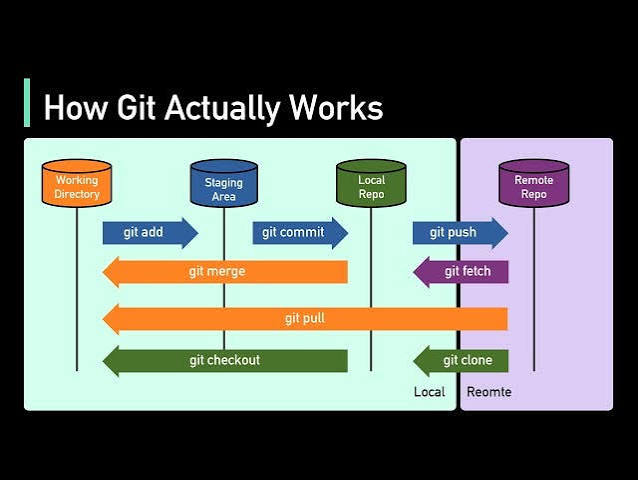
Git is not necessity to cover up talking with computers, but is such a significant part that it cannot be skipped. Software is an iterative process, codebase branching, multiple people working on the same thing. Git solves these neatly and in a very memory efficient manner.
Getting Git
Your ‘local’ codebase is connected with a ‘remote’ codebase. People ‘push’ all their changes to ‘remote’. Git is filled with commits. Each commit is a different state of the codebase.
Always git pull before starting your work. git add to add files to staging area meaning getting ready to commit your changes. git commit to create a commit. git push to push the changes to the remote repo.
There might also be conflicts when you push or pull the code. Conflict indicates that your local and remote codebase differ in some logic or cosmetics.
def add(a, b):
    return a + b

def add(x, y):
    return x + y
This is an example on how git might find conflict even when variable names are altered. Git is not smart like that
There are tons of stuff still in git that makes life of someone handling code changes easier. I seldom use any git commands other than what is mentioned above. If you feel there is something that you need git to do and the above commands do not cover them, looking up an use case always helps.
Making realistic software
Before jumping into making entire software, let’s understand what kind of software you could be making. I will use some undiscussed terms that will be covered further.
Before building out any software, ask yourself these questions : where does the compute happens? What grows the load on your software? What is the software fanning out ratio? What is the latency tolerance for requests?
Compute can happen on user’s local system or at your servers. A video editor does all its computation on your GPU whereas LLM chats like Claude have their own server. Load on your software could come from multiple concurrent users or increased compute per user. Fanning out ratio is the type of communication in between users and with the software. Building Instagram, you would be responsible for algorithms specific to each user. Gmail can realistically allow to load data when you refresh, but google meet needs to send you data real time. This is what latency tolerance indicates.
Rough categories:
- Local, single tenant and compute bound : Video editors, single player games.
- Real-time, high fan ratio and multi-tenant : Discord, Twitch, GoogleMeet, multiplayer games
- Request/Response, multi-tenant, not real time : Amazon, Flipkart, Gmail and other SaaS
- Compute bound : LLM chat application
- Infrastructure/platform : Databases, queues, load balancers
Infrastructure are the special software that other software use to build a reliable product.
Rough sketch of an app
Frontend and backend : Both are code with a very simple distinction. Backend code is behind an authenticated wall. Generally, people like to call logic as backend and frontend as UI. That would be a misnomer.
Frontend code can be modified by any user, therefore a line needs to be drawn of what code is to stay behind that authenticated wall.
Client-server model : Usually this backend code stays in a server. Whenever an authenticated user makes an authorized request, the server returns the requested data to the user. (Note the different use of authenticated and authorized words. Authentication doesn’t imply authorization to everything.)
APIs : These are the functions of another software that you are allowed to call given you follow some rules. Remember we had discussed how the data is sent in between 2 different IP. API calls can use different protocols to communicate with each other. REST API is such a protocol that uses HTTP. There are others.
Webhooks : You call an API to get data. Webhooks send you data without any call whenever an event happens at that connection. Example — a website showcasing realtime temperature reports that uses a webhook from satellite data.
Authentication vs Authorization : Authentication verifies who you are and authorization verifies what you are allowed to do on a software. A pro member of your software is allowed more features, but a normal user shouldn’t be blocked out of the entire software.
Accept cookies? : You must have seen the prompt on most of the websites that you visit. So when you log in to a website, it creates a session ID on the server to remember when you logged in and authenticates you. Cookie keeps your session ID in your browser and sends the server this ID each time you make a HTTP request (could be anything from going to a sub-page or closing the website and opening it again) to free you from logging in every time you do a HTTP request.
Where the code runs - Infrastructure and Cloud
Your code needs CPU or GPU to run. It can either run on the user’s local machine, your computer or a cloud provider’s computer. You can take a cloud providers(AWS, GCP) CPU and GPU for compute. The cloud provider would take care of networking, keeping the server running, etc.
Virtual Machines : These are the software that pretend to be different OS. Sometimes you just have a Mac but need to check the compatibility of your software on a Windows. Run a VM. Cloud providers can provide compute on a direct VM. Types of VM : Ubuntu, Mac, Windows, Arch Linux.
Dockers : VM solves the OS problem. Docker solves the software problem. The problem : Suppose you are working on a software and you are using some versions of other dependent software. Now, you want your teammate to work on it. He has to install all these software again. (Unlike in a React project where you just npm install , it is difficult to install dependencies when you are dealing in a product with multiple frameworks and languages.) Docker solves this by bundling all these software into a single container. Run the container without worrying about any dependency.
Kubernetes : A software running in a docker would be a process (Remember, a program that is being run is called a process). This allows you to run multiple instances of the same docker container. It is also possible that you run multiple docker processes of multiple containers. Your software might require running x number of docker A and y number of docker B for its full functioning. Kubernetes makes sure that there are x As and y Bs running all the time.
Other cloud services : cloud also provides storage, database, load balancers and other automation tools.
Scaling — horizontal vs vertical : If you have 5 Gb of RAM, increasing it to 10Gb is vertical scaling. Creating another VM or server with 5gb of RAM would be horizontal scaling. When you opt for horizontal scaling, a load balancer comes into play. All traffic passes through the LB and it routes them to where the compute is least busy.
Understanding Docker and Kubernetes
I am providing a service of calculating sum or subtraction of 2 numbers. Naturally I create 2 functions — Add and Sub. Both take around 10ms to compute. Initially, I had around 1 customer per 10s. I could manually assign the numbers to either function and give the customer his result.
Customer density grew to 1 per second. I devised a queue where user would put their request in. The smart queue sends the request to the workers(the functions). The workers after completion, push the answer to another queue. Customers get their result from these queue. Neat.
My problems started when the density of customers was 1 per millisecond. In order to avoid stagnation, I can’t let customers wait more than 10ms (the actual compute time). So, I decide to run 10 workers each using docker. This solves my problem.
I still need to monitor the customer density and change the number of docker instances. I have to automate this as well for a complete automated system. I use Kubernetes. Kubernetes can monitor the density and scale horizontally the number of dockers needed.
The system that we just discussed now is called PubSub. It is one of the most popular service a cloud provides. ChatGPT when you send a message sends your request to a queue with this PubSub like service.
Some remaining engineering processes
Environments — dev, stage, production : dev and production are self explanatory. Staging is environment which is as close as possible to production, to test out your software in a randomized environment.
CI / CD : Continuous Integration are the tests written for automating integrating your local code to the remote codebase. Continuous Development are the tests which are ran after your code passes the CI, to push into staging / prod area. More than automating, it removes human as a safety net, removing any possible human error.
Testing — unit test and integration tests : Unit tests are written for every features in isolation. Integration tests are for your software in a whole.
Logging, monitoring, observation : PostHog is a very popular data analytics tool which can be used for all of the mentioned purpose.
Wrapping things up
Avoid Monoliths. Monoliths are single codebase doing everything from user authentication to compute. Break them down to smaller services — microservices. You can run these microservices in multiple services and let them talk with each other — distributed system. You need to have a queue system to manage these systems talking with each other. Queue breaks the hard latency to a soft one. You will face issue when some services are busy and you need to decide what happens now — do you go for a cached outdated answer (availability) or say the system is down avoiding to provide wrong answer (consistency)? User needs to wait in the case of consistency but gets instant answer when chosen availability. It is important to understand that you can’t be consistent and available at the same time.
Amazon, Whatsapp message delivery follow availability mode. Banking systems, concert/ticket booking platforms use consistency mode. Cost of being wrong vs cost of being unavailable.
Read on how these platforms provide value when hosting a website : hostinger, cloudflare, posthog, GCP, firestore.
Things yet to cover
- AI/ML architecture
- More on systems thinking
- Databases
- Some product breakdown